Birdbuddy Home vs Nook: The $99 Smart Feeder May Be the Better Buy

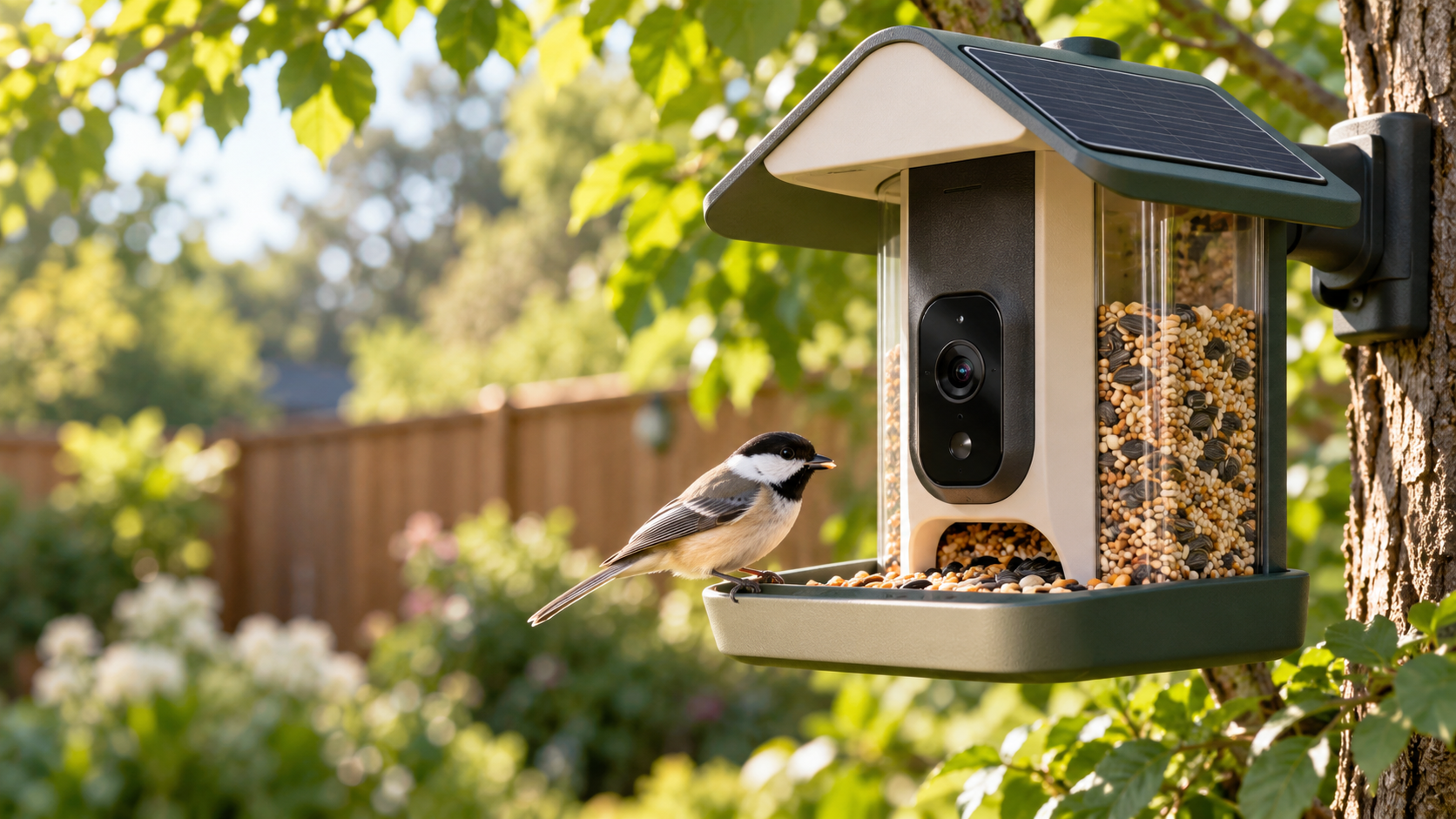
A modern smart bird feeder with an integrated camera and solar roof attracting a colorful backyard bird

Birdbuddy expanded its smart-feeder lineup on October 22, 2026, with two products built around the same new 2K HDR camera: the $99 Nook and the $219 Home. That shared camera makes the cheaper model unusually compelling. Most buyers are paying the extra $120 for a larger seed reservoir, integrated solar charging, tougher weather protection and a few convenience upgrades—not a better core bird-identification experience.

After comparing the specifications with early hands-on coverage and a long-term Home test, the value case is straightforward: buy Nook if you want Birdbuddy’s current camera and app at the lowest price; buy Home if minimizing refills and charging matters more than the upfront cost.

Quick verdict

  • Best value: Nook at $99. It gets the 2K HDR camera, 135-degree field of view, fast wake-up and Birdbuddy’s AI-assisted species recognition.
  • Best for lower maintenance: Home at $219. Its six-cup reservoir, dual integrated solar panels and longer perch are designed for less frequent attention.
  • Best middle ground: Nook Solar at $159, although the $60 solar premium narrows the gap to Home.
  • Existing Pro owners: do not assume either new model is an automatic image-quality upgrade. Independent hands-on testing found tradeoffs as well as speed improvements.

Price and configurations

Nook starts at $99 with a 3.8-cup seed reservoir and no built-in solar charging. Nook Solar costs $159 and adds the matching solar roof. Home costs $219 and includes a six-cup reservoir, dual integrated solar panels, a perch extender, dual-band Wi-Fi and an IP67 rating.

Those prices position Nook as the entry point, but it is not a stripped-down camera. Birdbuddy says both new feeders use the same 2K HDR imaging system, 135-degree view, instant wake-up and continuous capture. Both can record in portrait or landscape orientation, and both work with the same Birdbuddy app.

What both feeders share

The common camera is the most important detail in this comparison. It can capture higher-resolution clips than the previous generation, while the wider framing gives a bird more room to move without immediately leaving the shot. Birdbuddy’s app turns visits into notifications and uses computer vision to suggest the species it sees.

The hardware is also modular. The camera can be removed from the feeder body, which helps with charging, cleaning and future accessories. Neither model requires a paid plan just to receive visits, but some advanced identification and cloud features sit behind Birdbuddy’s membership tiers.

Nook vs Home: the hardware differences
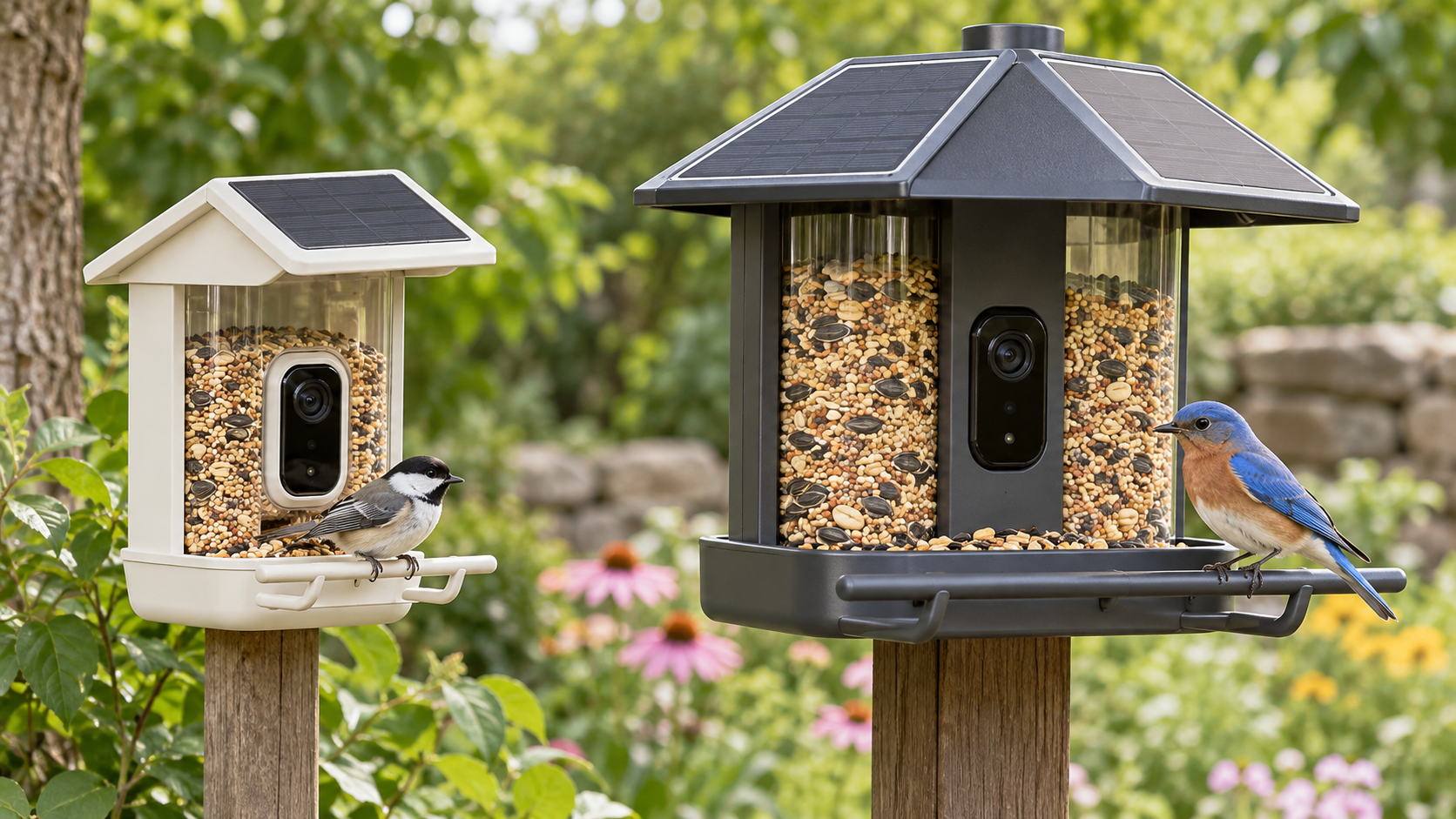
Nook vs Home: the hardware differences

Nook keeps the essentials small

Nook is the simpler design. Its 3.8-cup reservoir should be sufficient for a modest backyard setup, and the smaller body is easier to place where a bulky feeder would look intrusive. The base $99 package relies on periodic wired charging. If the location receives dependable sun, the $159 Nook Solar package can reduce that chore.

The key compromise is capacity. Active feeders can empty quickly, particularly in colder weather or where several species visit. Nook owners should expect to refill more often than Home owners. That may be an acceptable exchange for a lower price and a smaller visual footprint.

Home is built around fewer interventions

Home’s six-cup reservoir holds roughly 58 percent more seed than Nook’s 3.8 cups. Its dual solar panels are integrated rather than optional, and its perch extender offers more room for larger birds. Dual-band Wi-Fi adds 5GHz support alongside 2.4GHz, which can be useful close to a modern router, while the IP67 rating gives Home the clearest on-paper weather-resistance advantage.

Home therefore makes the most sense when the feeder will be inconvenient to reach, when bird traffic is heavy, or when the owner simply values fewer refills and charging sessions. The camera experience alone does not justify the price difference; the maintenance savings might.

Why Nook is the better value for most yards

At $99, Nook costs less than half as much as Home while preserving the features that make a smart feeder interesting: a capable camera, fast capture, visit notifications and species suggestions. For a first-time buyer who does not yet know how much use a backyard feeder will get, the lower entry price reduces the risk.

The Verge’s hands-on testing also found that a Nook livestream opened in under eight seconds, compared with roughly 30 seconds for the older Bird Buddy Pro. That is a practical improvement: a slow live view often means the bird has already flown away when the video appears.

Nook Solar is a less obvious bargain. Its $159 price is still $60 below Home, but buyers who already know they want solar power should decide whether another $60 is worth the larger reservoir, integrated dual-panel roof, longer perch, IP67 rating and dual-band Wi-Fi. In a busy yard, Home can earn back that difference in convenience.

When Home is worth $219

Choose Home when access is awkward or bird traffic is consistently high. A six-cup reservoir can materially extend the interval between refills, and built-in solar charging avoids the decision of whether to add an accessory later. Home is also the safer specification choice for exposed locations because Birdbuddy lists an IP67 rating.

The premium is harder to defend for a feeder mounted near a door or window, where refilling and charging are easy. In that setting, Home’s main benefits become comfort rather than necessity. Nook delivers the same generation of camera for substantially less.

Real-world issues the spec sheet does not solve

Squirrels remain the first adversary

Tom’s Guide used an early Home unit for about 10 months and found that squirrels still required active countermeasures. A smart camera does not make a feeder squirrel-proof. Placement, pole guards and seed choice can matter as much as the feeder body, so budget for a baffle if squirrels are common.

Weather resistance and lens moisture deserve attention

The same long-term test reported moisture inside the removable lens cover after rain. The reviewer noted that the issue may have been specific to an early unit, but it is worth inspecting the camera after storms. Home’s IP67 specification is reassuring, yet no outdoor camera should be treated as maintenance-free.

The new camera is faster, not unambiguously better

The Verge praised the speed of the new platform but found the image more distorted near the edges than on the outgoing Pro, with a viewpoint that can feel more like looking down on the bird. That does not erase the value of 2K HDR capture, but existing Pro owners should compare real samples before replacing a working feeder.

What the Birdbuddy membership costs

Birdbuddy’s current membership page lists Premium at $69.99 per year. The Verge also reports a $7.99 monthly option. Paid features include automatic species identification and additional cloud or app capabilities; availability can change by plan and region.

Treat that fee as part of the total cost if automatic identification is a must-have. Over two years, a $99 Nook plus two annual Premium renewals reaches about $239 before tax—already more than the Home hardware by itself. Buyers who are comfortable reviewing visits without every premium feature can keep the ownership cost lower.

A relevant Amazon alternative for existing inventory

Birdbuddy says the outgoing Pro is being removed from its own store, with remaining inventory expected to continue through Amazon through the end of 2026. That makes the Birdbuddy Pro Solar a relevant price-check for shoppers who prefer the older camera perspective or find it discounted.

Check the current Birdbuddy Pro Solar price on Amazon. This is an affiliate link; ReaderSpice may earn a commission from qualifying purchases at no extra cost to you. Prices and availability can change.

Bottom line

Nook is the smarter default. It preserves the new 2K HDR camera and app experience at $99, leaving enough room in the budget for seed, a squirrel baffle or a membership. Home is the better tool for a specific buyer: someone with a busy feeder, an exposed installation or a strong preference for fewer refills and charging sessions.

The most important buying question is not which feeder takes better pictures—they share the same camera. It is how often you are willing to service the feeder. If the answer is “whenever needed,” choose Nook. If the answer is “as little as possible,” Home’s larger, solar-equipped body can justify the premium.

Sources

Inline image: Side-by-side comparison of a compact smart bird feeder and a larger solar smart bird feeder

Inline alt text: Compact smart bird feeder beside a larger model with dual solar panels, a bigger seed reservoir and a longer perch
Birdbuddy Home vs Nook: The $99 Smart Feeder May Be the Better Buy

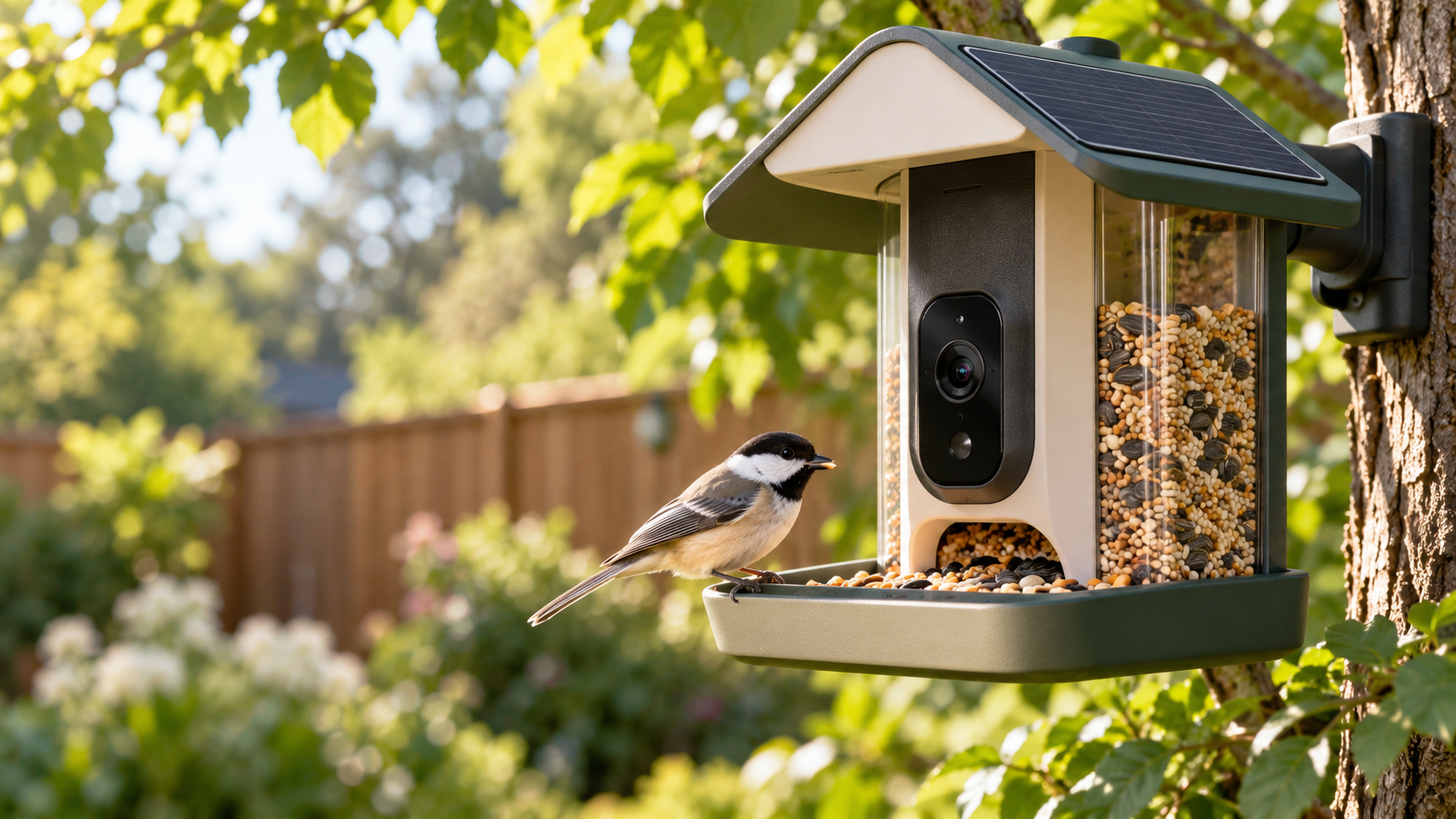
A modern smart bird feeder with an integrated camera and solar roof attracting a colorful backyard bird

Birdbuddy expanded its smart-feeder lineup on October 22, 2026, with two products built around the same new 2K HDR camera: the $99 Nook and the $219 Home. That shared camera makes the cheaper model unusually compelling. Most buyers are paying the extra $120 for a larger seed reservoir, integrated solar charging, tougher weather protection and a few convenience upgrades—not a better core bird-identification experience.

After comparing the specifications with early hands-on coverage and a long-term Home test, the value case is straightforward: buy Nook if you want Birdbuddy’s current camera and app at the lowest price; buy Home if minimizing refills and charging matters more than the upfront cost.

Quick verdict

  • Best value: Nook at $99. It gets the 2K HDR camera, 135-degree field of view, fast wake-up and Birdbuddy’s AI-assisted species recognition.
  • Best for lower maintenance: Home at $219. Its six-cup reservoir, dual integrated solar panels and longer perch are designed for less frequent attention.
  • Best middle ground: Nook Solar at $159, although the $60 solar premium narrows the gap to Home.
  • Existing Pro owners: do not assume either new model is an automatic image-quality upgrade. Independent hands-on testing found tradeoffs as well as speed improvements.

Price and configurations

Nook starts at $99 with a 3.8-cup seed reservoir and no built-in solar charging. Nook Solar costs $159 and adds the matching solar roof. Home costs $219 and includes a six-cup reservoir, dual integrated solar panels, a perch extender, dual-band Wi-Fi and an IP67 rating.

Those prices position Nook as the entry point, but it is not a stripped-down camera. Birdbuddy says both new feeders use the same 2K HDR imaging system, 135-degree view, instant wake-up and continuous capture. Both can record in portrait or landscape orientation, and both work with the same Birdbuddy app.

What both feeders share

The common camera is the most important detail in this comparison. It can capture higher-resolution clips than the previous generation, while the wider framing gives a bird more room to move without immediately leaving the shot. Birdbuddy’s app turns visits into notifications and uses computer vision to suggest the species it sees.

The hardware is also modular. The camera can be removed from the feeder body, which helps with charging, cleaning and future accessories. Neither model requires a paid plan just to receive visits, but some advanced identification and cloud features sit behind Birdbuddy’s membership tiers.

Nook vs Home: the hardware differences

Nook vs Home: the hardware differences

Nook keeps the essentials small

Nook is the simpler design. Its 3.8-cup reservoir should be sufficient for a modest backyard setup, and the smaller body is easier to place where a bulky feeder would look intrusive. The base $99 package relies on periodic wired charging. If the location receives dependable sun, the $159 Nook Solar package can reduce that chore.

The key compromise is capacity. Active feeders can empty quickly, particularly in colder weather or where several species visit. Nook owners should expect to refill more often than Home owners. That may be an acceptable exchange for a lower price and a smaller visual footprint.

Home is built around fewer interventions

Home’s six-cup reservoir holds roughly 58 percent more seed than Nook’s 3.8 cups. Its dual solar panels are integrated rather than optional, and its perch extender offers more room for larger birds. Dual-band Wi-Fi adds 5GHz support alongside 2.4GHz, which can be useful close to a modern router, while the IP67 rating gives Home the clearest on-paper weather-resistance advantage.

Home therefore makes the most sense when the feeder will be inconvenient to reach, when bird traffic is heavy, or when the owner simply values fewer refills and charging sessions. The camera experience alone does not justify the price difference; the maintenance savings might.

Why Nook is the better value for most yards

At $99, Nook costs less than half as much as Home while preserving the features that make a smart feeder interesting: a capable camera, fast capture, visit notifications and species suggestions. For a first-time buyer who does not yet know how much use a backyard feeder will get, the lower entry price reduces the risk.

The Verge’s hands-on testing also found that a Nook livestream opened in under eight seconds, compared with roughly 30 seconds for the older Bird Buddy Pro. That is a practical improvement: a slow live view often means the bird has already flown away when the video appears.

Nook Solar is a less obvious bargain. Its $159 price is still $60 below Home, but buyers who already know they want solar power should decide whether another $60 is worth the larger reservoir, integrated dual-panel roof, longer perch, IP67 rating and dual-band Wi-Fi. In a busy yard, Home can earn back that difference in convenience.

When Home is worth $219

Choose Home when access is awkward or bird traffic is consistently high. A six-cup reservoir can materially extend the interval between refills, and built-in solar charging avoids the decision of whether to add an accessory later. Home is also the safer specification choice for exposed locations because Birdbuddy lists an IP67 rating.

The premium is harder to defend for a feeder mounted near a door or window, where refilling and charging are easy. In that setting, Home’s main benefits become comfort rather than necessity. Nook delivers the same generation of camera for substantially less.

Real-world issues the spec sheet does not solve

Squirrels remain the first adversary

Tom’s Guide used an early Home unit for about 10 months and found that squirrels still required active countermeasures. A smart camera does not make a feeder squirrel-proof. Placement, pole guards and seed choice can matter as much as the feeder body, so budget for a baffle if squirrels are common.

Weather resistance and lens moisture deserve attention

The same long-term test reported moisture inside the removable lens cover after rain. The reviewer noted that the issue may have been specific to an early unit, but it is worth inspecting the camera after storms. Home’s IP67 specification is reassuring, yet no outdoor camera should be treated as maintenance-free.

The new camera is faster, not unambiguously better

The Verge praised the speed of the new platform but found the image more distorted near the edges than on the outgoing Pro, with a viewpoint that can feel more like looking down on the bird. That does not erase the value of 2K HDR capture, but existing Pro owners should compare real samples before replacing a working feeder.

What the Birdbuddy membership costs

Birdbuddy’s current membership page lists Premium at $69.99 per year. The Verge also reports a $7.99 monthly option. Paid features include automatic species identification and additional cloud or app capabilities; availability can change by plan and region.

Treat that fee as part of the total cost if automatic identification is a must-have. Over two years, a $99 Nook plus two annual Premium renewals reaches about $239 before tax—already more than the Home hardware by itself. Buyers who are comfortable reviewing visits without every premium feature can keep the ownership cost lower.

A relevant Amazon alternative for existing inventory

Birdbuddy says the outgoing Pro is being removed from its own store, with remaining inventory expected to continue through Amazon through the end of 2026. That makes the Birdbuddy Pro Solar a relevant price-check for shoppers who prefer the older camera perspective or find it discounted.

Check the current Birdbuddy Pro Solar price on Amazon. This is an affiliate link; ReaderSpice may earn a commission from qualifying purchases at no extra cost to you. Prices and availability can change.

Bottom line

Nook is the smarter default. It preserves the new 2K HDR camera and app experience at $99, leaving enough room in the budget for seed, a squirrel baffle or a membership. Home is the better tool for a specific buyer: someone with a busy feeder, an exposed installation or a strong preference for fewer refills and charging sessions.

The most important buying question is not which feeder takes better pictures—they share the same camera. It is how often you are willing to service the feeder. If the answer is “whenever needed,” choose Nook. If the answer is “as little as possible,” Home’s larger, solar-equipped body can justify the premium.

Sources

Inline image: Side-by-side comparison of a compact smart bird feeder and a larger solar smart bird feeder

Inline alt text: Compact smart bird feeder beside a larger model with dual solar panels, a bigger seed reservoir and a longer perch
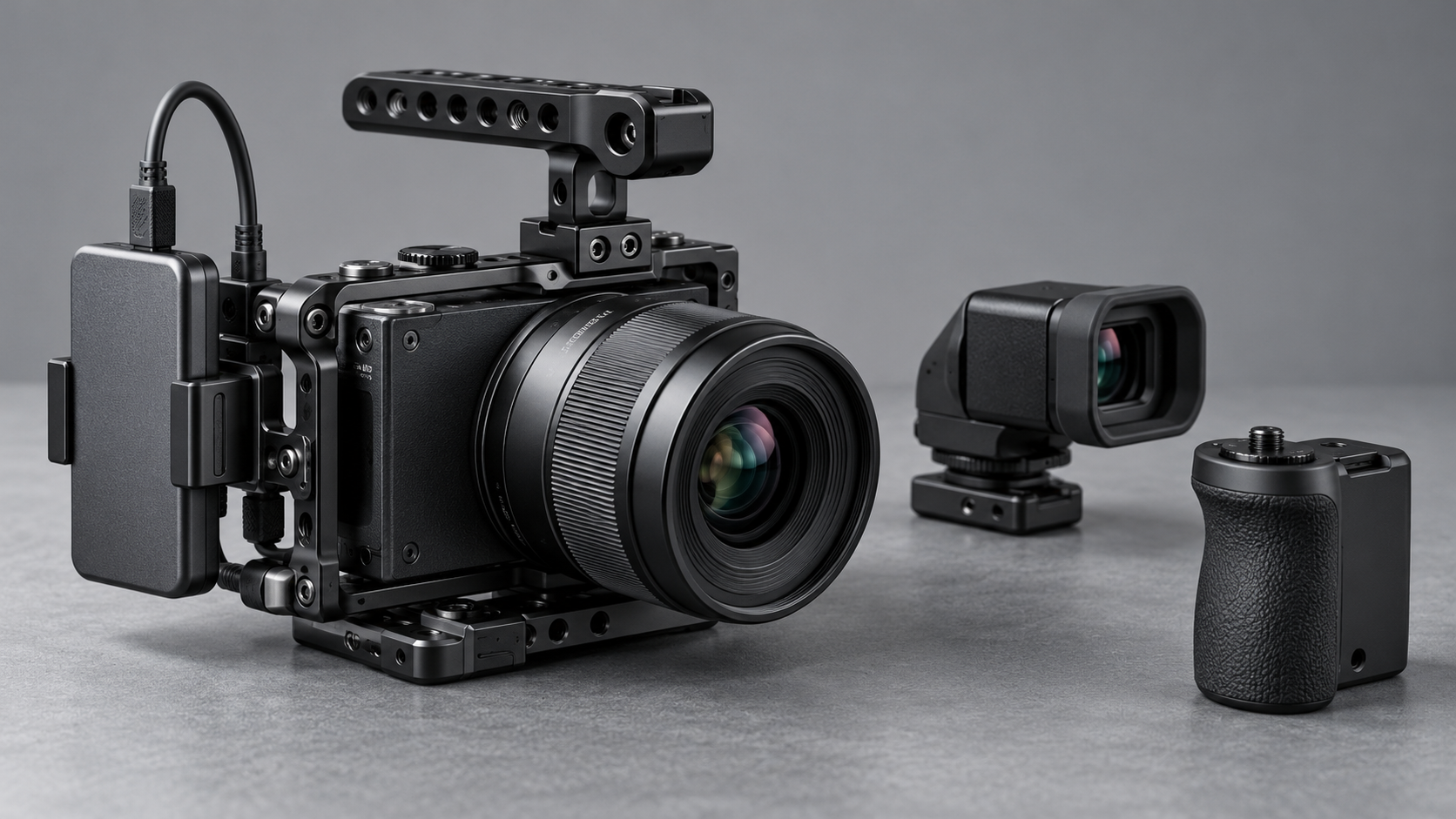
Sigma FP2: A Tiny 6K Full-Frame Camera With Big Tradeoffs

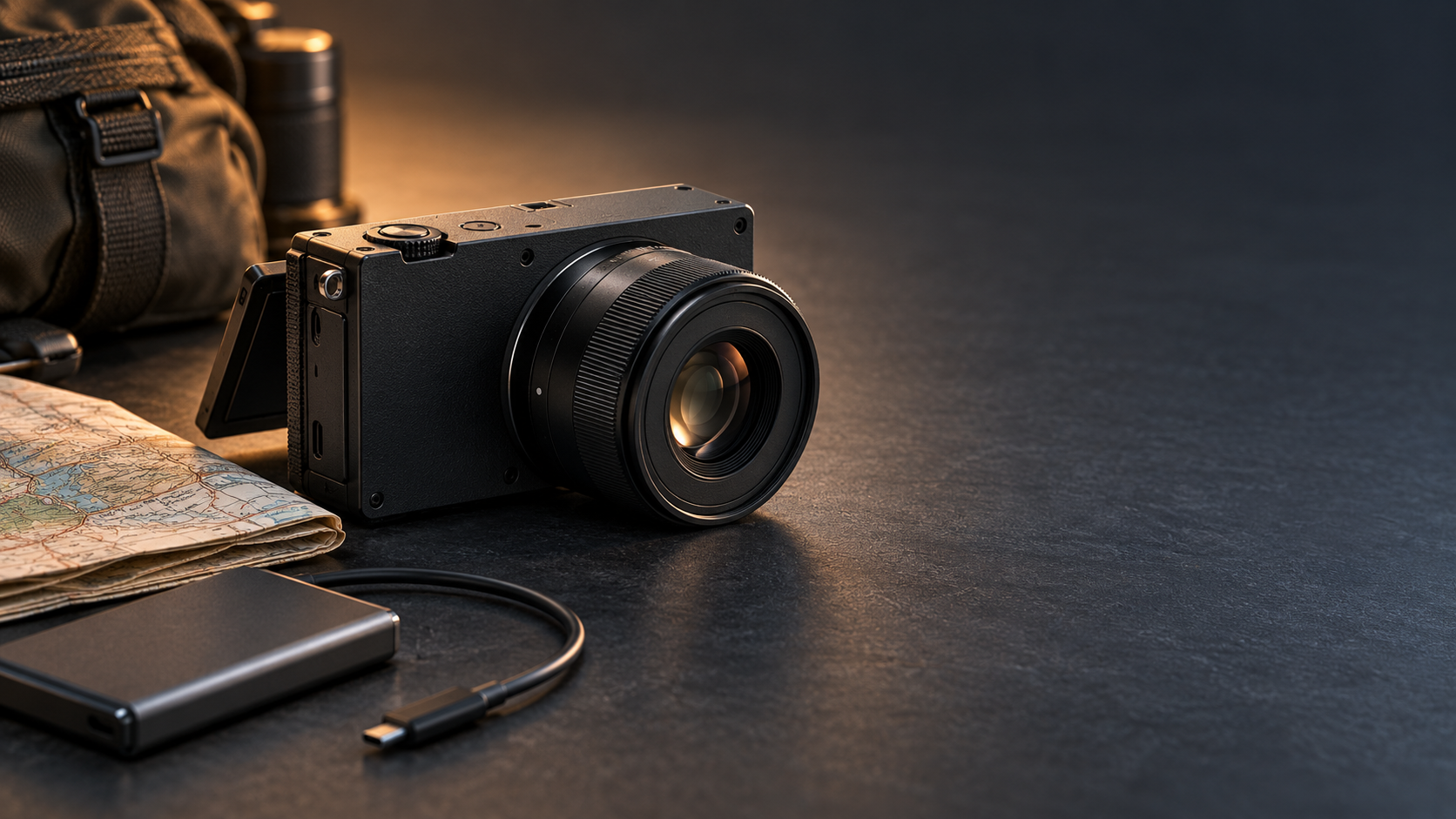
Compact black full-frame mirrorless camera with a small prime lens, travel map and external SSD cable

Sigma has revived its smallest full-frame camera concept with the FP2, a $2,199 modular hybrid that arrives November 11, 2026. The headline upgrades are substantial: a 24.5-megapixel partially stacked sensor, phase-detection autofocus, 6K open-gate video, a tilting screen, 70GB of built-in storage and much longer burst depth.

The appeal is easy to understand. The FP2 puts serious stills and cinema tools in a body small enough to build into a lightweight travel or gimbal rig. The catch is just as important: there is no in-body image stabilization, built-in viewfinder or conventional handgrip. The camera is deliberately incomplete until each buyer decides what to attach.

Sigma FP2 price, release date and key specifications

Sigma says the FP2 will be available on Wednesday, November 11, 2026. U.S. pricing starts at $2,199 for the body, while review coverage lists a $2,749 kit with either Sigma’s new EVF-21 electronic viewfinder or the compact 50mm F2 DG DN Contemporary lens.

The essentials at a glance:

  • 24.5MP partially stacked full-frame CMOS sensor
  • L-Mount lens system with separate STILL and CINE interfaces
  • Up to 20 frames per second for stills and a buffer rated for roughly 200 images
  • 6K open-gate recording at up to 59.94p in supported compressed formats
  • ProRes RAW recording to an external SSD, plus L-Log and 13 color modes
  • Hybrid phase- and contrast-detection autofocus with people, dog, cat and bird recognition
  • 70GB of internal storage, one SD card slot, two USB-C ports and full-size HDMI
  • Tilting 3.2-inch rear display; optional 5.76-million-dot EVF-21
  • Approximately 370-shot battery rating and 460g operating weight with battery and card

These numbers place the FP2 closer to a compact production tool than a conventional entry-level mirrorless camera. Its price makes the missing viewfinder and stabilization impossible to ignore, but the connectivity and recording options are unusually ambitious for the body size.

What the partially stacked sensor changes

The original Sigma fp was admired for its size but limited by slow sensor readout and contrast-detection autofocus. The FP2’s partially stacked sensor is designed to read data faster, helping reduce rolling-shutter distortion and supporting quicker bursts, higher frame-rate video and more responsive subject tracking.

Resolution remains around 24.5 megapixels. That is enough for large prints and most professional web work, but it offers less room for aggressive cropping than 40MP or 60MP rivals. The payoff is speed: Sigma now quotes up to 20fps and a buffer of about 200 frames, a major change from the original fp’s very shallow high-speed burst.

Early hands-on reports broadly agree that image quality is excellent and autofocus is much more dependable. Reviewers also note that subject selection can still be inconsistent. This is a meaningful upgrade, not proof that Sigma has surpassed the most mature sports and wildlife autofocus systems.

Why the FP2 is more video-first than it looks

Why the FP2 is more video-first than it looks

The small body hides a serious video toolset. Open-gate recording uses the full 3:2 sensor area, giving editors extra room to create widescreen and vertical crops from the same take. Supported compressed modes reach 6K/59.94p, while ProRes RAW is available to an external SSD at lower maximum frame rates. Cropped 4K can reach roughly 120p.

Sigma also includes monitoring tools, L-Log, gyro data for stabilization in post and dedicated CINE controls. Two USB-C ports matter here: one can handle high-speed storage while the other supports power or accessories. Full-size HDMI is a welcome choice on a camera likely to be connected to monitors and recorders.

That flexibility makes the FP2 especially interesting for solo filmmakers, travel crews and gimbal operators. A compact body can be easier to balance and can leave more payload capacity for a lens, cage, microphone or monitor. The built-in 70GB of storage is also a useful emergency reserve when a memory card is full or unavailable.

The biggest compromise: no in-body stabilization

The FP2 does not have mechanical in-body image stabilization. For stills, that means slower shutter speeds require steadier technique, a tripod or a stabilized lens. For handheld video, the limitation is more obvious: small camera movements remain visible, and electronic or post-production correction cannot fully reproduce sensor-shift stabilization.

Gyro metadata can help compatible software smooth footage later, but stabilization in post crops the frame and adds another processing step. Reviewers found handheld video challenging even with careful technique. Anyone imagining the FP2 as an all-in-one walkaround video camera should budget for a gimbal, rig support or stabilized L-Mount lens.

The limitation is less serious when the camera is locked to a tripod, mounted on a vehicle, placed on a motorized stabilizer or used in a controlled studio. In those jobs, removing the stabilization mechanism helps Sigma preserve the camera’s small dimensions. The design makes sense—but only for buyers whose workflow already solves camera shake.

A modular body means accessories can erase the size advantage

Sigma’s philosophy is to start with a clean rectangular body and let the owner add only what the job requires. That is attractive for specialized rigs, but less convenient for photographers who expect a camera to feel complete out of the box.

There is no built-in electronic viewfinder. The optional EVF-21 adds a high-resolution tilting OLED finder and an eye sensor, but it also adds cost and bulk. The flat body has no substantial grip, and larger lenses can make it front-heavy. A grip or cage improves handling while making the overall package less pocketable.

The same tradeoff applies to the hot shoe. Sigma offers a separate HU-21 hot-shoe unit for users who need flash or accessory mounting. Photographers should price the body, viewfinder, grip, hot shoe, spare battery and preferred lens as a system rather than treating $2,199 as the finished cost.

How the FP2 fits into an L-Mount kit

The FP2 uses the L-Mount shared by Sigma, Panasonic and Leica, so buyers can choose from compact primes, fast professional zooms and specialized cine glass. Small lenses are the natural match. Sigma’s 50mm F2 Contemporary kit option preserves the camera’s minimalist character while providing a general-purpose normal field of view.

Larger lenses are fully usable, but they shift the balance away from the body. A 24–70mm F2.8 zoom, for example, may be optically versatile yet demand a grip, cage or lens support. The FP2 is most convincing when the complete rig is designed around its size rather than when it is treated as a tiny body for any lens.

Who should consider the Sigma FP2?

The FP2 makes the most sense for:

  • Filmmakers who want 6K open-gate capture in a very small L-Mount body
  • Gimbal and drone operators who value low body volume and flexible mounting
  • Travel creators who can work with compact primes, an external SSD and planned stabilization
  • Studio shooters who prefer tethered, tripod-based or modular production setups
  • Existing L-Mount owners who already have lenses and accessories

It is a harder recommendation for photographers who rely on a viewfinder, shoot long handheld sessions or want stabilized stills and video without extra equipment. A larger conventional hybrid can deliver a more comfortable grip, built-in EVF and IBIS for less total system cost.

A relevant lens for the FP2

The compact Sigma 50mm F2 DG DN Contemporary for L-Mount is one of the FP2’s official kit-lens options and is a natural match for its small body. Check the Sigma 50mm F2 DG DN Contemporary for L-Mount on Amazon.

Disclosure: ReaderSpice may earn a commission from qualifying purchases made through the Amazon link above, at no additional cost to you.

Amazon prices, sellers and availability can change. Confirm that the listing is the L-Mount version—not the Sony E-mount version—and verify the seller and return policy before ordering.

Bottom line

The Sigma FP2 is not trying to be the safest all-round mirrorless camera. It is a compact full-frame imaging core that becomes a stills camera, cinema rig or travel kit depending on what surrounds it. The faster sensor, improved autofocus, deep burst, tilting display, internal storage and 6K open-gate recording address many weaknesses of the original fp.

Its omissions are equally defining. No IBIS, no built-in EVF and minimal ergonomics mean the smallest body can lead to a larger, more expensive complete setup. Buyers who need a modular 6K platform may find that trade worthwhile. Everyone else should compare the cost and size of the finished rig, not the body alone.

Sources

Sigma — FP2 launch schedule and official announcement

DPReview — Sigma FP2 review and full specifications

TechRadar — Sigma FP2 hands-on review

The Verge — Sigma FP2 launch, pricing and connectivity overview

Digital Camera World — Sigma FP2 hands-on video assessment

Qualcomm Snapdragon 8 Gen 3 Impresses in Galaxy S24 Ultra Benchmark Leaks.

Qualcomm is rumored to be launching the Snapdragon 8 Gen 3 chipset next month. A leaked benchmark score suggests that the overclocked Snapdragon 8 Gen 3, specifically designed for the Galaxy S24 Ultra, achieved an impressive multi-core score of 7,400 on Geekbench. This is a significant improvement compared to last year’s Snapdragon 8 Gen 2, which scored 4,975 on the same benchmark. According to the latest rumors, Samsung is expected to use its own Exynos 2400 SoC for the Galaxy S24 and S24+ while reserving the Snapdragon 8 Gen 3 exclusively for the Galaxy S24 Ultra. This strategy is similar to Apple’s approach with the iPhone 15 Pro models, which feature the new 3nm A17 Pro chipset, while the non-Pro versions are powered by the 4nm A16 Bionic. The Snapdragon 8 Gen 3 for Galaxy is rumored to include a prime CPU core running at 3.30GHz and three performance CPU cores at 3.15GHz, among other features. The official announcement of the Snapdragon 8 Gen 3 is expected to take place at the Snapdragon Tech Summit in October or November.

Powerful CPU and GPU:
The Snapdragon 8 Gen 3’s CPU and GPU are two of its standout features. The CPU, likely based on ARM’s Cortex-X2 architecture, is expected to provide a significant boost in single-core performance, essential for tasks that demand high processing power. Meanwhile, the GPU, believed to be an Adreno 730, promises to deliver stunning graphics and improved gaming experiences.

What Does This Mean for Consumers?
For consumers eagerly anticipating the next generation of flagship smartphones, the Snapdragon 8 Gen 3 brings good news. The impressive benchmark results suggest that upcoming devices equipped with this chipset will offer exceptional performance, making multitasking, gaming, and content consumption smoother and more enjoyable.

Additionally, the chipset’s AI capabilities can enhance everyday tasks and user experiences. From improved photography to extended battery life, these AI-driven features have the potential to make smartphones even more versatile and user-friendly.