Qualcomm is rumored to be launching the Snapdragon 8 Gen 3 chipset next month. A leaked benchmark score suggests that the overclocked Snapdragon 8 Gen 3, specifically designed for the Galaxy S24 Ultra, achieved an impressive multi-core score of 7,400 on Geekbench. This is a significant improvement compared to last year’s Snapdragon 8 Gen 2, which scored 4,975 on the same benchmark. According to the latest rumors, Samsung is expected to use its own Exynos 2400 SoC for the Galaxy S24 and S24+ while reserving the Snapdragon 8 Gen 3 exclusively for the Galaxy S24 Ultra. This strategy is similar to Apple’s approach with the iPhone 15 Pro models, which feature the new 3nm A17 Pro chipset, while the non-Pro versions are powered by the 4nm A16 Bionic. The Snapdragon 8 Gen 3 for Galaxy is rumored to include a prime CPU core running at 3.30GHz and three performance CPU cores at 3.15GHz, among other features. The official announcement of the Snapdragon 8 Gen 3 is expected to take place at the Snapdragon Tech Summit in October or November.
Powerful CPU and GPU:
The Snapdragon 8 Gen 3’s CPU and GPU are two of its standout features. The CPU, likely based on ARM’s Cortex-X2 architecture, is expected to provide a significant boost in single-core performance, essential for tasks that demand high processing power. Meanwhile, the GPU, believed to be an Adreno 730, promises to deliver stunning graphics and improved gaming experiences.
What Does This Mean for Consumers?
For consumers eagerly anticipating the next generation of flagship smartphones, the Snapdragon 8 Gen 3 brings good news. The impressive benchmark results suggest that upcoming devices equipped with this chipset will offer exceptional performance, making multitasking, gaming, and content consumption smoother and more enjoyable.
Additionally, the chipset’s AI capabilities can enhance everyday tasks and user experiences. From improved photography to extended battery life, these AI-driven features have the potential to make smartphones even more versatile and user-friendly.
The Nostalgia Retro 2-Slice Wide Slot Breakfast Station is a countertop appliance that combines a toaster, a griddle, and a 2-slice toaster oven into one unit. It is designed to save space and make it easy to prepare breakfast for a small family or group.
The toaster has two wide slots that can accommodate bagels, English muffins, and thick slices of bread. The griddle has a non-stick surface that makes it easy to cook eggs, pancakes, and other breakfast foods. The toaster oven has a capacity of 0.3 cubic feet and can be used to bake, broil, or toast.
The Nostalgia Retro 2-Slice Wide Slot Breakfast Station is made of durable metal and plastic. It has a retro-style design that will look great in any kitchen. It is easy to use and clean.
Here are some of the pros and cons of the Nostalgia Retro 2-Slice Wide Slot Breakfast Station:
Pros:
Saves space
Easy to use
Easy to clean
Retro-style design
Compact size
Cons:
Not as powerful as separate appliances
Some users have reported that the toaster does not toast evenly
Some users have reported that the griddle is not as large as they would like it to be
Overall, the Nostalgia Retro 2-Slice Wide Slot Breakfast Station is a great option for those who are looking for a compact and easy-to-use appliance for preparing breakfast. It is not as powerful as separate appliances, but it is a good value for the price.
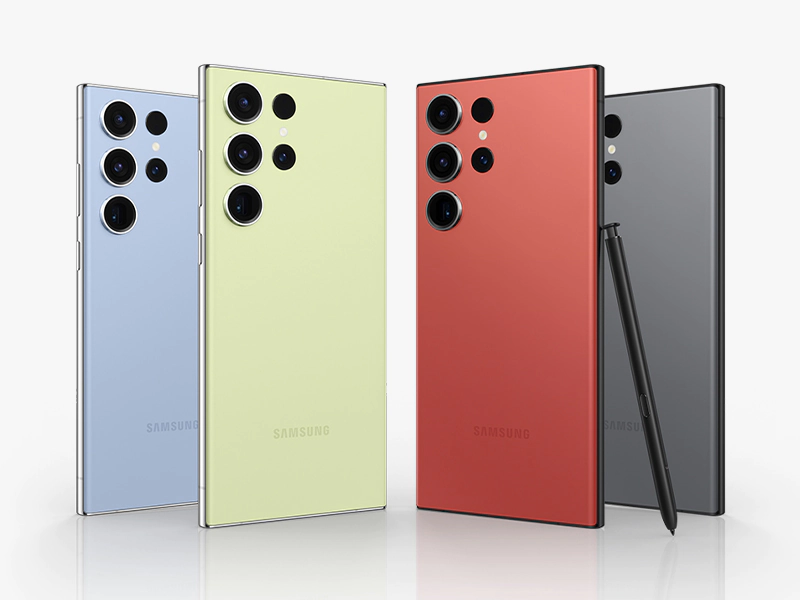
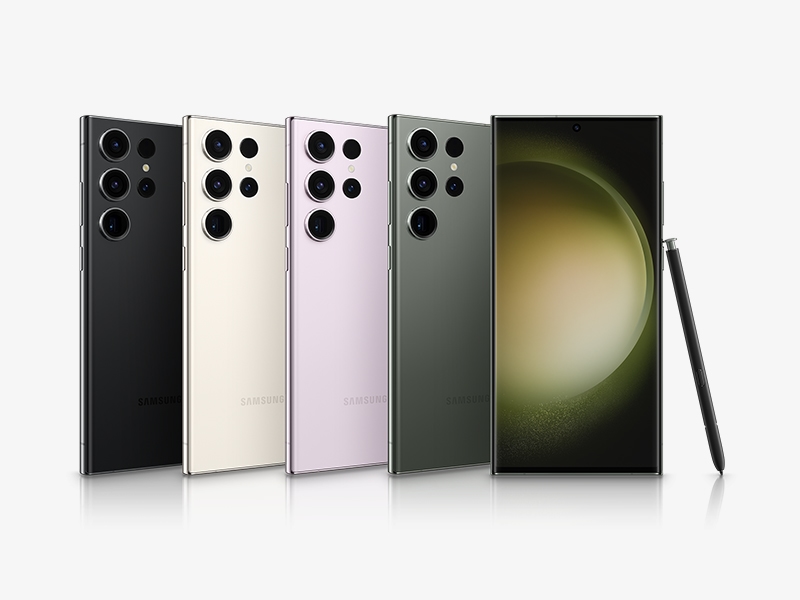
Samsung is a household name in the world of smartphones, and the company’s latest offering, the Samsung Galaxy S23 Ultra, is no exception. The device has been released in Feb 2023 and is a significant upgrade from its predecessor, the S22 Ultra.
The Samsung Galaxy S23 Ultra has a massive 6.8-inch Dynamic AMOLED 2X Infinity-O display with a 1440 x 3200 pixel resolution. The device also feature a 120Hz adaptive refresh rate, 500 ppi with 1750 nit (outdoor Peak) making it one of the most fluid and responsive displays in the market. The phone’s screen is protected by the latest version of Corning Gorilla Glass, which should offer improved durability and resistance to scratches.
Under the hood, the Samsung Galaxy S23 Ultra is set to pack a punch with the Qualcomm Snapdragon 8 Gen2 Mobile chipset made only for Galaxy, which is expected to provide lightning-fast processing speeds and improved battery life. The device comes with 8GB || 12GB of RAM and 256GB, 512GB and 1TB of internal storage, making it a powerhouse that can handle even the most demanding tasks with ease.
Photo: Samsung.com
The Samsung Galaxy S23 Ultra is also set to feature an improved camera system, with a quad-camera setup that includes a 200MP Wide main sensor, a 12MP ultra-wide sensor, 10MP Tele 3X & 10X Optical zoom, and a 100X Space Zoom. The front camera has 12 MP f/2.2. The phone’s camera system has also improved AI capabilities, which should help users take better photos and videos, regardless of the lighting conditions. Galaxy S23 has 5000mAh battery life with maximum optimization which last longer than 1 day.
Overall, the Samsung Galaxy S23 Ultra is shaping up to be one of the most impressive smartphones in the market, with a massive display, lightning-fast processing speeds, and a top-of-the-line camera system. It’s clear that Samsung has set the bar high with its latest flagship offering.
Sometimes we really get frustrated, when we don’t have a proper Wifi signal or slow internet. We try to buy an expensive modem/router however, the problem still stay at the same place. First thing we need to understand that, buying an expensive modem/router does not mean you suppose to get faster and reachable internet every where throughout the home.
All of these above issues will occur to the people who owns a big house. Especially if the house is two story or one story with more than 3000 sqft. Most of the time, many houses Modem/Router is located at one corner of the house because it’s easy for ISP (Internet Service Provider) technician to run the wire from outside of your house to your one of the bedroom or living room that is close to the internet box outside your house. Also, most of the houses media box is located at the corner bedroom, so that they don’t have to run long wire from the internet box located in front of your house.
Reason I am talking about all of these issues because we are suffering from bad reception or slow connection. First and foremost thing that you need to find out the speed you are getting from your ISP. Modem/Router’s bandwidth, number of people are allow to connect will be another thing to take a look on it.
I recently bought a router from an Amazon and I was amazed with its performance and coverage. I did make a video about the Unboxing and review of this product where I have shown each and every step on how to setup this router. My video is about 23 minutes, but you can setup this router within 10 minutes if you follow an instructions properly.
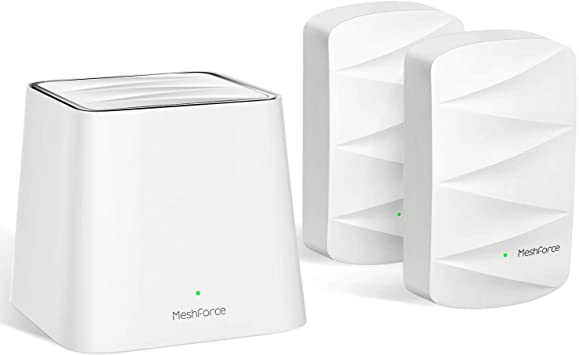
It’s a beautiful designed Wifi Router with it’s Extender and is compact in one small Box. The whole system is small and light weight however, the performance of the device is most focused topic here today. The MeshForce Whole Home Mesh Wifi System comes with one Router and 2 Wifi Dot (Extender). This dual band wifi system router will replace your current router because this is a high performance router that can cover your 5 plus Bedrooms Home.
I was surprised that this device does not come with nice and fancy box. But please don’t judge the book by its cover. The three devices are properly packed in the simple box.
The installation was very easy, the easiest I have tried. Guaranteed less than 10 minutes. I plugged the wire and electric adaptor, downloaded the available software. Make sure you have iOS or Android, because you won’t able to dial in using the computer. You have to connect your iOS/Android using the SSID and the password written under the “cute white” cube – which is the main/central device. Than, they will ask you a question to change the new SSID and password. Just all! Than you install the extenders and let them connect/sync by themselves – wait for few minutes. I am sure 100% that my grandma can do it.
All devices are white, including the power adaptor and wire. Cute and fancy. It won’t mess your fancy décor at your home. Let’s talk about the quality. I am Network Engineer and have weird apartment layout. My apartment is fully concrete so having Mesh type WAP (Wireless Access Point) is very challenging. Not all Mesh device will work in my apartment. Sure, I have professional devices like Cisco that cost you for almost a thousand. MeshForce worked well so far. I have this for five days without any drop signal even I use microwave. Please keep it in mind the wifi will drop because microwave. I have more than 7 devices and about 10 iOT. The transfer between the computer is very fast – no complain about this even we use them at the same times. I have android, iOS, Windows and Linux. All have no issue to connect with this devices. The range is very wide, I can get the signal from my neighbor apartment. i.e. I got -30 db for the distance 10 meters from the extender. How good is it?
I love the features Fast Roaming (please, turn this on when you don’t have old system – you will appreciate even more) and Parental Control. I am hoping that they keep upgrading the firmware with more features.
Nothing is perfect in the world, isn’t it?. This device only have one LAN slot – so if you have multiple devices that requires wire, get the cheap switches. Also, if I can access this device via remotely without downloading the apps, it will be perfect.
I can say this is a perfect devices for who does not know how to setup network. It is extremely easy and simple. It is also good quality, no drop wifi and able to handle more than 12 devices surely. No need to call GeekSquad or your tech to install this – call your grandma (maybe). Compare to other Mesh devices, MeshForce is very affordable. If you are lucky, you can get coupon in the box to purchase the third extender (if necessary).
New Generation Mesh WiFi: Replace your old wireless router with new Meshforce M3 WiFi system. Equipped with Gigabit Ethernet, flawless and flexible AC1200 Dual band M3 system supports up to 60 devices, It is a smart hub to connect everything wirelessly.
Eliminate WiFi Dead Spots: Cover more than 4000 sq.Ft. from garage to backyard. One WiFi name for entire house. Easy to expand the coverage by plugging more dots to eliminate WiFi dead spots. Support up to 6 dots to build WiFi system for any home size.
Easy to Setup and Manage: Use My mesh app and complete setup your mesh WiFi System in less than 15 minutes. Manage your connections and guest network right on your iOS or Android mobile devices, at home or remotely, anytime and anyplace.
Secure Connection to Your Smart Home: Your data are securely protected under WPA/WPA2 pk mixed security – the industry level password encryption. Welcome your visitors with Guest Network in isolated WiFi zone, guards your privacy and smart home access.
7×24 Customer Support: You don’t need to be a Pro because we are here. 7×24 online customer support, ask us anything at any time. Backed by 30 days money-back and Awarded customer service.
Product description
Color:1 WiFi Point+2 Dot
Introducing MeshForce M3 Suite, the second generation MeshForce whole home mesh WiFi coverage system. Seamless and super high-performance coverage across your big house.
The New Generation WiFi Performance
MeshForce model M3 supports gigabit ethernet and 1200Mbps dual band WiFi on both 802.11n and 802.11ac. Upgraded WiFi performance covers bigger area compare with M1.
M3 Dot for Further Flexible WiFi
Introducing new M3 Dot wall plug WiFi extension unit, a powerful and mini WiFi extender that only works with your MeshForce WiFi system. No need power cords or wires, simply plug in and add the dots in the app, your WiFi range becomes wider.
One SSID for Entire Home
MeshForce’s Mesh technology allows multiple mesh points communicate with each other and self-heals the network quality. It allows you walk from upstairs to down, from garage to backyard without disconnecting because the mesh system always back your strong WiFi signal.
Manage WiFi on Mobile Remotely
We made setup and manage WiFi easier. Now you can set up your WiFi with My Mesh mobile app, rather than through your old router’s complicated admin page. You can even control your home WiFi remotely in the App (Sign-in required).
Secure and Reliable
Higher class WPA2 Mixed encryption mode protects your WiFi password and data in better way. Now you can provide temporary WiFi access with guest mode to your visitors. (Enable this feature in the app)
Tech Specs:
AC1200 Simultaneous Dual-band WiFi
On 5GHz: 802.11ac Up to 867Mbps
On 2.4GHz: 802.11n/g/b Up to 300Mbps
Mixed WPA/WPA2-PSK Security
1x shared Gigabit WAN/ LAN Port / 1x Gigabit LAN Port
Supports PPPOE, Dynamic IP, Static IP, Bridge Mode
My Mesh App System Requirements:
Use iOS or Android mobile device to setup
iOS 9 or higher/ Android 4.4 or higher
In the Box:
1× MeshForce M3 WiFi Point
2× MeshForce M3 Dot
1× Ethernet Cable
1× Quick Start Guide
Very easy to set up and use. Great product overall. App is very straightforward and everything connected right away. Plug & play with the extra mesh points makes it a great addition for any room. No cables, no QR codes to scan, very awesome.
So I was holding off from posting my review till I had a through chance.to test this out for few days. Here’s my impression about the product:
1. Very easy to setup, literally plug and play (if you dont want to alter wifi network parameters)
2. Though its a tech product, however I have to admit it looks great. It looks like a small palm sized speaker. There’s no protruding antennas on this router. I ended up keeping the main router on my tv stand (see attached pic)
3. Amazing performance. I’m getting no dead spots anywhere in my house. The internet speed instantly increased 2x times as compared to my current AC1900 router (see speed test screen shots attached). The WLAN speed is near 1gbps (see attached pic). My internet speed is varying between 70-100 Mbps thru out the house, previously I had very patchy connection on the bedrooms (in the bedrooms i used to get 2-9mbps at times with my previous router).
3. Using their mobile app (you have to download that from app store) you can quickly register the product to control it from anywhere on the planet. Its extremely simple to alter various network parameters, even a non techie person will find it very easy.
No doubt this is a five star product and I would highly recommend it to anyone else looking to upgrade their wifi. I’m very happy with the product.
Live streaming is common nowadays in social media. Facebook, Twitter, youtube and many other social media platforms offer this feature. Streaming live video is easy as long as you own the smartphone. Every smartphone has social media app, which features Live streaming within the app. Are there any restrictions for live streaming on these platform?
Today, we are not going to talk live streaming of every social media platform. We are going to discuss about the Live stream features on YouTube. Youtube is a biggest video sharing website founded in February 2005. As time passed along, the popularity of YouTube has gone bigger and bigger. According to MerchDope.com, 1.3 billion people uses YouTube and 300 hours of videos are uploaded on YouTube every single day. Also, 5 billion videos are watched on Youtube everyday.
By knowing all of the above facts, we know that YouTube is the most popular video hosting site in the world. Many YouTubers are growing on YouTube with their popularity as well as financially and everyday new user signup to become YouTuber.
The more people landed on YouTube as a video publisher, YouTube is restricting and adding more policy every now and then. They have a strict rules and guidelines that every video publisher must follow, otherwise get ready for Account Termination.
We are not going to talk about all the features or restrictions that YouTube has currently. We are only going to talk about the live streaming restrictions that YouTube has.
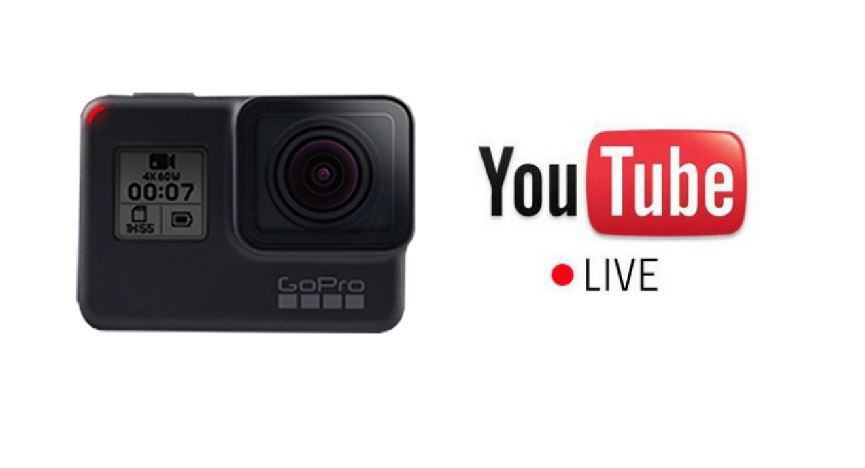
Live Streaming on YouTube was much easier like Facebook. However, every now and then YouTube sets a policy to make a community safe. YouTube has updated a policy by raising the threshold for YouTube Live Stream with Mobile. From now on, you won’t be able to do a live streaming from your mobile device, if you have less than 1000 subscribers. This includes a GoPro Hero 7 camera as well, since GoPro Hero 7 Action camera is considered under mobile devices. This compliance has only applied in Mobile devices who has less than 1000 subscribers. However, it does not effect other live streaming tools and you can still live stream from your desktop even if you have less than 1000 subscribers.
We do not know what thresholds YouTube will come with again. However, YouTube is creating strict rules and guidelines that every user must follow and it’s getting more difficult for the new YouTubers. New YouTubers need to come up with strong content, video quality, audio quality and so on. It’s getting harder and harder everyday because of the tough competition as well as YouTube policy being updated every now and then.
What you think about this threshold?
Does it effect you or you think it will effect new user without this feature?
What is you concern regarding this threshold?
People won’t be able to play mobile game called “PUBG” in Nepal from today. The game “PUBG” was widely popular in Nepal among Youth kids and children, where Nepali Telecommunication has blocked/banned this game in Nepal. These players won’t be able to play this specific games now throughout the country. At the special request of the Central Research Bureau of Police, the authorities have directed all the internet companies to ban this game “PUBG”. A letter has been sent from the Authority on Thursday not to download and play the PUBG game.
According to psychiatrist, this game is pushing human to violence. Sometime ago neighbors have banned the game in some cities of India. The news of arresting some youths in Gujrat came to Indian Media as well.
A 20-year-old young man death has become viral in India due to PUBG game. Indian media reported that the deaths of those young people who had been playing “PUBG” mobile games for almost 45 days continuously have died due to extreme pain in their neck. After some time, expert discovered that this game “PUBG” is creating a Mental problem, therefore they suggested to stop this game as soon as possible to stop creating these types of problem.
This might be too late to update. However, many people still has not received this update yet. Especially, people who carries Samsung Unlocked Phones. Samsung usually wait until all other carriers to push the updates n their carrier devices. And the last one will be Samsung Unlocked Phones.
All other carrier has received their new Android Pie update for their most of the galaxy devices either S version or Note version.
Here I will be talking about the Samsung Galaxy Note 9, which I myself carry this phone.
I really don’t know when this update was pushed out because I never check my automatic update to save battery. Therefore, when I manually check to see if we as a unlocked phones received any updates and Bomb!!
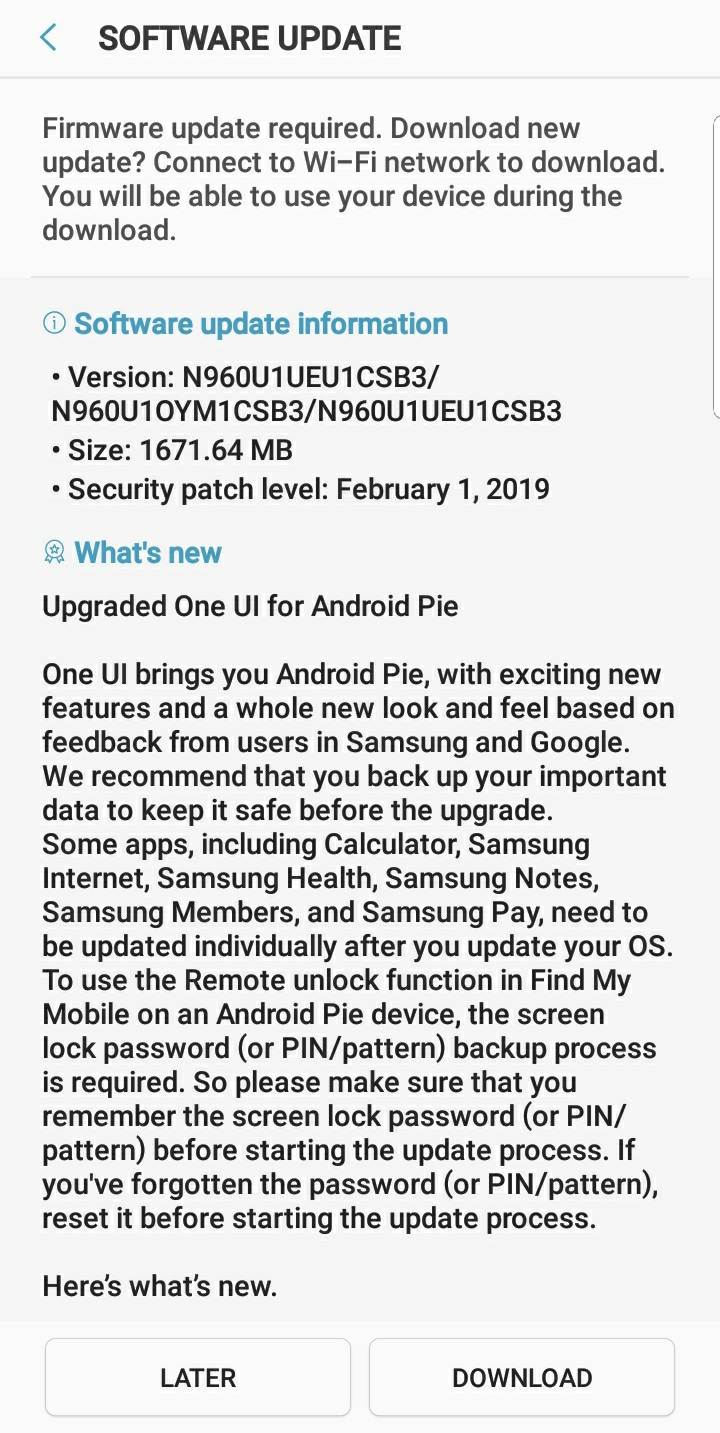
Today, March 19, 2019 just saw that there is an update or Firmware update required.
Basically, when you compare the both version and the size, it looks like the Android Pie will get installed on the device. Current version just says that
Device stability improvements, bug fixes
New and / or enhanced features.
Further improvements to performance.
So, by looking above information, we can simply say that it’s just a basic patch that will fix some bugs and will do an improvement based on the logs that they have received.
On the new update, the file size is massive, which is 1671.64 MB that equals to 1.67 GB. Also, when it says Upgraded One UI for Android Pie. When it says that, really not sure if it does upgrade with new android as well including One UI or just One UI. We would need to find out once we download and install the update.
Current Android Version on my Phone is 8.1.0, which is definitely a Oreo. Samsung Experience Version is 9.5. So, basically on the What’s new section it does say that “One UI brings you Android Pie, with new features and a whole new look and feel based on feedback from users in Samsung and Google.”
Alright, I don’t even have to download and install to find out whether it will install the Android pie on the device or not. Since, it just says right there that it One UI comes with Android Pie. Whenever, you get those types of updates, specially a firmware upgrade, they always wants you to backup your important data just in case. Because these updates will upgrade it’s stock calculator, Samsung Internet, Samsung Health, Samsung Notes, Samsung Members, and Samsung Pay, need to be update individually. It also advised to make sure that your pin/password that you remembered or change/reset your password before upgrading. I know many people use their fingerprint or face unlock nowadays and this won’t work when your device reboots.
What is One UI?
One UI is a piece of software that was developed by Samsung for its Android devices. This software is basically the front-end of the samsung’s devices. This software has been designed for big screen phones where they can use the device with one-handed. Samsung is retiring Samsung Experience and TouchWiz software on the latest device as well as the upcoming devices after its success history.
So, what’s new on the One UI? What has changed from Samsung Experience? We are going to list all the changes that is happening on One UI.
Samsung One UI
The Content, Settings, and other information have been reorganized to make sure that you focused on the task at hand.
Samsung is always trying their best to make their UI user friendly, so they have moved their elements at the bottom for the easier user. Since, new generation phone’s size are getting bigger and bigger, normal person’s are unable to reach to specific destination with one-hand and Samsung did a good job so that anyone can reach the elements from the bottom no matter how big the phone is.
New night mode feature has been added to feel your eyes in comfort level at night time.
All of the above features are the core features that you can see on One UI. However, that’s not it. There are a lot of other features that we are going to tell you below.
Notifications:
Would you get disturbed with the messages that you need to reply while watching videos or playing games?. Yes, this new upgrade will allow you to reply your text right on the notification panel and you can see few previous threads on the notification as well. Image thumbnails are included in message notifications and you can switch on and off to any notifications right from your notification panel.
Samsung Keyboard:
Samsung has created a new unicode 11.0 emoji keyboards. This keyboard will match your color with your surrounding apps. Also, the floating keyboard with new size and transparency option with all the apps. You can set a touch and hold delay to this new keyboard.
Device Maintenance now called Device Care
Performance modes are streamlined and integrated into power saving modes.
The Edge panel for device maintenance has been discontinued.
Always on Display:
New clock style shave been added, including the option to show a calendar with your schedule.
Charging information has been added to let you know how much time is remaining until fully charged.
You can show Always On Display whenever the screen if off, or you can set it to show for 30 seconds when you tap the screen.
Settings:
Settings menu has been reorganized to make it easier to find.
Samsung DeX
Even your phone is connected on your DeX or TV, you can still continue using your phone.
Now just use DeX supported HDMI, where you do not need DeX Station to use this feature.
Bixby
New improvements and features have been added on Bixby.
Explorer the latest features and apps including swipe left from the main bixby screen.
Control your bixby button with the single and double press on bixby dedicated key.
Phone
Able to sort all the calls including incoming and outgoing calls.
Now call history can be 2000 entries, where it used to be 500 in earlier version.
Contacts:
The new drawer menu makes it easier to manage contacts from various accounts.
Camera:
Automatically detect the color optimizer on the camera’s color settings to fit the scene.
Gallery:
Photo Editor Pro’s editing tools have been added to Gallery, so you can make all your edits and touchups without leaving the app.
My Files:
The new storage analysis tool has been added to help you monitor your storage usage and save space.
You can now show or hide items on My Files Home screen
Samsung Health:
Your daily step count will be shown in the notification panel. To hide it, press and hold the notification, then turn off Current steps.
Other improvements and changes
Turn on the screen automatically whenever you pick up your phone using the Lift to wake feature.
Access Kids Home on the quick panel.
Call stickers has been discontinued.
HELF images are now supported.
All of these above Samsung One UI features has from Samsung documents which you will see the link when you upgrade. We will update more on this page, if we find any other extra features that was not included in here. Have you seen any other extra features in Android Pie or Samsung One UI that was not listed here, than please do comment below.
The term Cloud hosting indicates, the strategy of operational an online website on various servers. there’s associate limitless method energy in cloud hosting as we are going to invariably add an innovative server to proportion the growth or productivity of any business. Cloud computing hosting is actually the supply of machine resources like information and software on-demand via a defined and estimable computer network, and not from any neighborhood server. In Cloud computing, the patrons submit a way, like processing, towards the cloud computing service provider and procure their methodology completed successfully whereas not the need for possessing the applying or hardware.
Rewards: primarily the foremost important blessings of such net service is its measurability and worth effectiveness. Quantifiability refers to the expansion of the web data processor with minimum limitations. an honest cloud server hosting effectively covers load reconciliation and hardware up-gradations. Cloud hosting can keep from the challenges like server crash and migration of an online page from a shared server to a committed server. Other further edges contain the Application Programming Interface (API) accessibility to an application. The API service permits laptop|portable laptop} or computer machines to act with cloud software. This terribly is run among an analogous suggests that rather just like the worm helps humans to act with all the computer systems. The cloud computing hosting service permits the patrons to access their systems on the Internet despite their location and as a result, providing place independence.
Applications: If you’re transcription to set up a business but distressed regarding the initial investments or expenditures on application and hardware installations or does one need to believe your company’s growth gets compact as a result of restricted investment on sources, then cloud email hosting area unit the foremost helpful risk for you. It brings many positive aspects by implies that of that you will be able to successfully manage your company’s demands and productivity with no larger investments among the initial stages.
Cloud Servers may be a cloud infrastructure service that allows users to deploy “one to several cloud servers instantly” and build “advanced, high availability architectures” virtually just like the Amazon Elastic calculate Cloud. The “cloud servers” unit virtual machines running on the Xen hypervisor for Linux-based instances, and Citrix XenServer for Windows and UNIX operating system instances. Each quad-core hardware node has between 16 and 32 GB of RAM, granting allocations between 256 MB and 30 GB. Disk and central process unit allocations proportion with memory, with disk sizes ranging from 10 GB to 620 GB.numerous distributions of UNIX operating system unit supported, additionally as Arch, CentOS, Debian, Fedora, Gentoo, Red Hat Enterprise UNIX operating system and Ubuntu.
The technology behind the service was purchased in Rackspace’s Gregorian calendar month twenty 2, 2008 acquisition of Slicehost and conjointly the servers were erstwhile mentioned as “slices”. These units “much cheaper and frequently easier to use than a traditional dedicated server”, although it’s still necessary to stay up the package and answer stack that won’t require for the Cloud Sites product. This can be one of the foremost differentiators between the two services; where Cloud Servers includes full root access and then permits for lots of customization, the Cloud Sites product may be a smaller quantity versatile but wants less maintenance.