

Amazon has introduced a new family of Kids Tablets that replaces the old Fire-only software formula with full Android and parent-managed access to Google Play. The lineup starts at $229.99, comes in 8.7-inch and 11-inch sizes, and ships in versions designed for children ages 3 and up or 6 and up.
The biggest upgrade is not simply a faster processor or a sharper screen. Parents can approve Google Play downloads, manage screen time remotely and keep Amazon Kids+ content and learning goals in the same dashboard. The buying decision therefore comes down to screen size, memory, case style, subscription cost and how much control a family wants over mainstream Android apps.
ReaderSpice may earn a commission from purchases made through links in this article. As an Amazon Associate, we earn from qualifying purchases.
Amazon Kids Tablet prices and release date
- Amazon Kids Tablet 8: starts at $229.99 with an 8.7-inch display, 4GB of RAM and 64GB of storage.
- Amazon Kids Tablet 11: starts at $329.99 with an 11-inch 2.5K display, 8GB of RAM and stylus support.
- Both sizes are sold in versions for ages 3+ and ages 6+, with different protective cases and age-tuned experiences.
- Every bundle includes one year of Amazon Kids+ and access to Parent Dashboard controls.
- U.S. preorders are open, with shipping scheduled to begin October 14, 2026.
- Amazon also lists October 14 availability for Canada, Mexico and Japan, followed by several European markets on October 19.
Amazon’s new Kids Tablet family
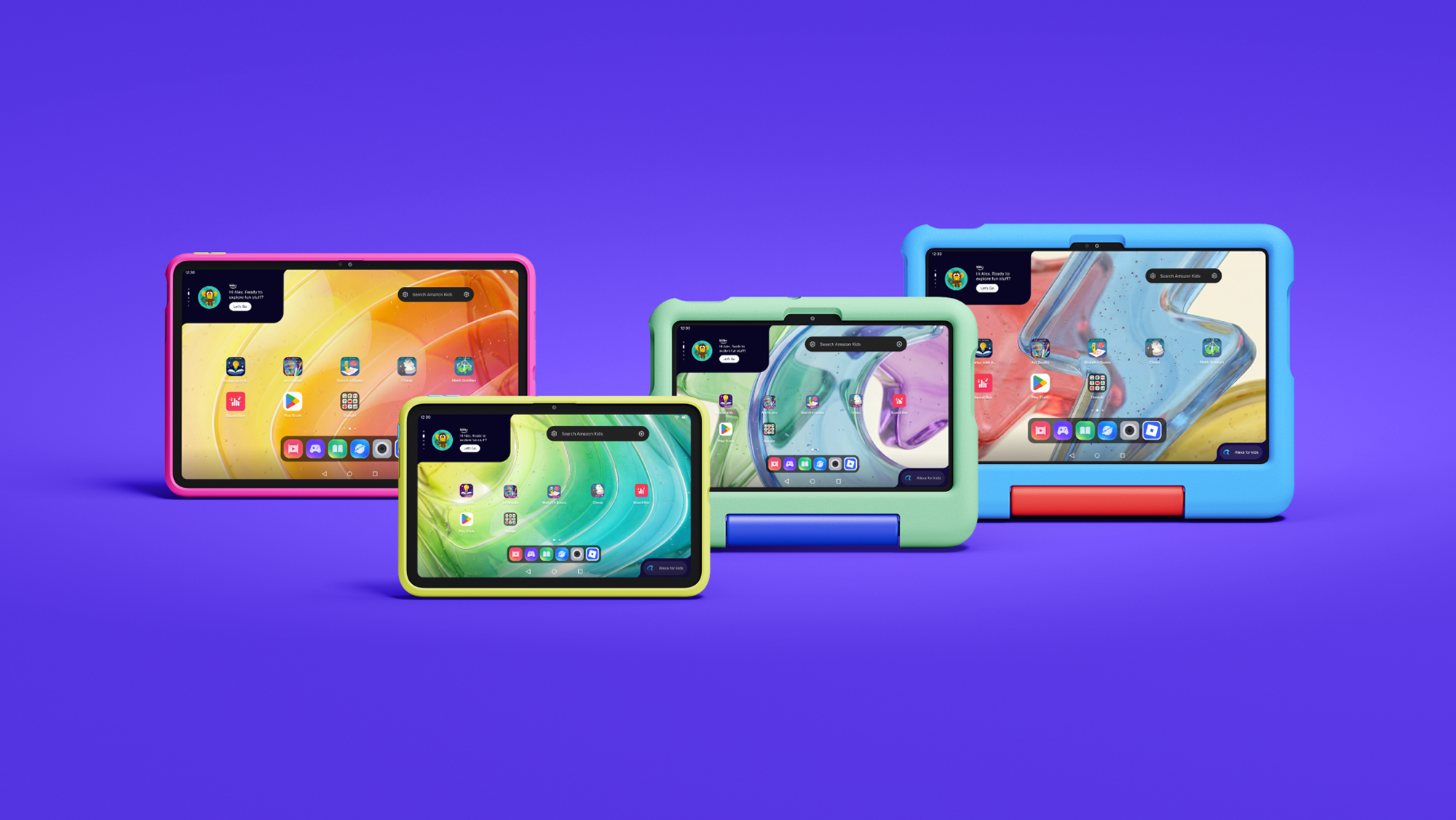
Amazon is using the Kids Tablet name rather than treating these devices as simple Fire tablet bundles. Both sizes run Android and support Google Mobile Services, which gives them access to the same Google Play ecosystem used by mainstream Android tablets.
That removes a long-standing limitation of earlier Fire Kids models, but it does not give children unrestricted app access. Amazon says every Google Play download goes through parental approval. The Parent Dashboard can also manage content filters, web access, time limits and learning goals from the tablet, a web browser or the companion app on a parent’s phone.
The four main bundle choices are Kids Tablet 8 for ages 3+, Kids Tablet 8 for ages 6+, Kids Tablet 11 for ages 3+, and Kids Tablet 11 for ages 6+. Character designs include Paw Patrol, Barbie and SpongeBob, though exact colors and characters can vary by size and market.
Kids Tablet 8 is the portable and lower-cost option
The Kids Tablet 8 uses an 8.7-inch 1340-by-800 IPS display. Amazon’s developer specifications list 4GB of LPDDR5 memory, 64GB or 128GB of internal storage, Wi-Fi 6, Bluetooth 5.3, an 8-megapixel rear camera and a 5-megapixel front camera.
Amazon rates the smaller tablet for up to 14 hours of video playback. That is a manufacturer estimate rather than an independent ReaderSpice test, so brightness, Wi-Fi use, games and background activity can change real-world battery life.
The 8.7-inch size is easier for smaller hands and less bulky for road trips, flights and restaurant bags. Its lower-resolution screen and 4GB of RAM make it the weaker choice for demanding games, split-screen work or keeping many apps open, but those limits may matter less for books, video and basic learning apps.
Kids Tablet 11 adds the screen and memory older children may need
The Kids Tablet 11 steps up to an 11-inch 2560-by-1600 IPS display, 8GB of LPDDR5 memory and 64GB or 128GB of storage. Amazon’s specifications also list Wi-Fi 6, Bluetooth 5.3 and 8-megapixel cameras on both the front and back.
The sharper screen and doubled memory are meaningful for drawing, schoolwork, multitasking and graphics-heavy games. Stylus support also gives the larger model a role beyond entertainment, although families should confirm whether the desired stylus is included with the exact bundle or sold separately.
The $100 price difference buys a much denser display and more memory, not just a larger body. For a child who will keep the tablet for several years, use more demanding apps or type longer assignments, the 11-inch model has the stronger hardware foundation.
Cases for ages 3+ and 6+

Amazon differentiates the age bundles primarily through their cases and child experience. The ages-3+ versions use a thicker soft bumper intended for younger children, while the ages-6+ versions use a slimmer hard case with a built-in kickstand.
Choose the age-3+ bundle when drop protection and a larger gripping surface matter more than portability. Choose the age-6+ bundle when the child is likely to carry the tablet in a backpack, prop it up for video or use it for homework. Parents should still compare the exact listing because themed designs and included accessories can differ.
Amazon’s announcement specifies a one-year limited warranty for the new Kids Tablets. Buyers familiar with older Fire Kids bundles should not assume that the same two-year worry-free replacement policy applies to every new configuration; verify the warranty shown on the final product page before ordering.
Parent Dashboard makes Google Play access manageable
Parent Dashboard is the control center for each child profile. Amazon says parents can set daily screen-time limits, create different weekday and weekend schedules, review recent activity, adjust age filters, manage web browsing, pause a device remotely and set Learn First goals that prioritize educational activity before entertainment.
Parents can create profiles for up to four children and change settings from the tablet, a browser or the Amazon Kids+ Parent Dashboard app for iOS and Android. That matters in multi-child households because each profile can have its own age filter, schedule and approved content.
Google Play access remains a parent decision. A child can request an app, but an adult approves the download. Amazon’s own help pages warn that third-party apps may contain advertising, outside links, in-app purchases, separate subscriptions or requests for personal information. Approval should therefore include checking the app’s developer, permissions, age rating and purchase settings rather than treating Google Play approval as a one-time switch.
Kids+ and Storybuilder add an ongoing subscription cost
Each tablet includes one year of Amazon Kids+, which combines books, videos, games, apps and audiobooks from brands such as Disney, Nickelodeon, LEGO and Sesame Street. Amazon lists ongoing U.S. pricing from $7.99 per month for Prime members and $8.99 per month for non-Prime customers after the included period.
At those published rates, another year costs $95.88 with Prime or $107.88 without Prime before taxes or future price changes. Families should decide whether the Kids+ catalog remains useful before the included year renews, especially if most preferred apps already come from Google Play.
Storybuilder is the new AI-assisted creative feature. Children can describe characters, settings and plot ideas by voice, and the service produces illustrated stories or comic books. Amazon says parents can view what children create in Parent Dashboard. Because it is a generative feature for children, parents should review the available controls and talk through what information should not be included in prompts.
Storage and app support need a pre-purchase check
Amazon’s developer specifications list 64GB and 128GB configurations for both sizes and show no external storage. That makes the storage tier important for families that download many games, movies or offline learning materials. The 64GB model may be adequate for streaming and lighter use, while the 128GB option provides more headroom when apps and videos will remain on the tablet.
The Kids Tablet 8 and 11 use the same MediaTek MT8189 platform according to Amazon’s technical pages, but memory and display differences can still affect experience. Neither model has independent long-term test data yet, so buyers who are not in a hurry may want to wait for reviews covering durability, thermal behavior, standby drain, display brightness and real battery life.
Which Amazon Kids Tablet should you buy?
- Choose Kids Tablet 8 for younger children, frequent travel, lighter entertainment use and the lowest starting price.
- Choose Kids Tablet 11 for older children, a sharper screen, drawing, homework, heavier games and longer-term use.
- Choose an ages-3+ bundle for the thick bumper case and easier grip.
- Choose an ages-6+ bundle for the slimmer kickstand case and easier backpack storage.
- Choose 128GB when the child will keep many large games or offline videos; Amazon’s specifications do not list microSD expansion.
- Wait for reviews if battery life, ruggedness or performance matters more than receiving the tablet at launch.
Amazon buying links
Compare the Amazon Kids Tablet 8 on Amazon for the current age bundle, storage option, case design, seller and delivery date before ordering.
Compare the Amazon Kids Tablet 11 on Amazon if the sharper 2.5K display, 8GB of memory and stylus support better fit the child’s needs.
As an Amazon Associate, ReaderSpice earns from qualifying purchases.
The bottom line
The new Kids Tablets are a more flexible choice than the old Fire-only approach because parents can approve mainstream Google Play apps without abandoning Amazon’s child profiles and management tools. That flexibility also creates more setup responsibility: adults must review app permissions, purchases, web access and subscription renewal rather than relying only on the included case and age label.
Kids Tablet 8 is the practical travel and younger-child pick. Kids Tablet 11 is the stronger long-term device for older children, creative work and demanding apps. For either size, choose the case style first, then storage, and treat the included year of Kids+ as a trial whose recurring cost should be reviewed before renewal.
Sources
Amazon: Kids Tablet launch, pricing, parental controls and availability
Amazon developer specifications: Kids Tablet 8
Amazon developer specifications: Kids Tablet 11
Amazon Help: Parent Dashboard controls and child profiles
The Verge: Kids Tablet Google Play access and launch details