
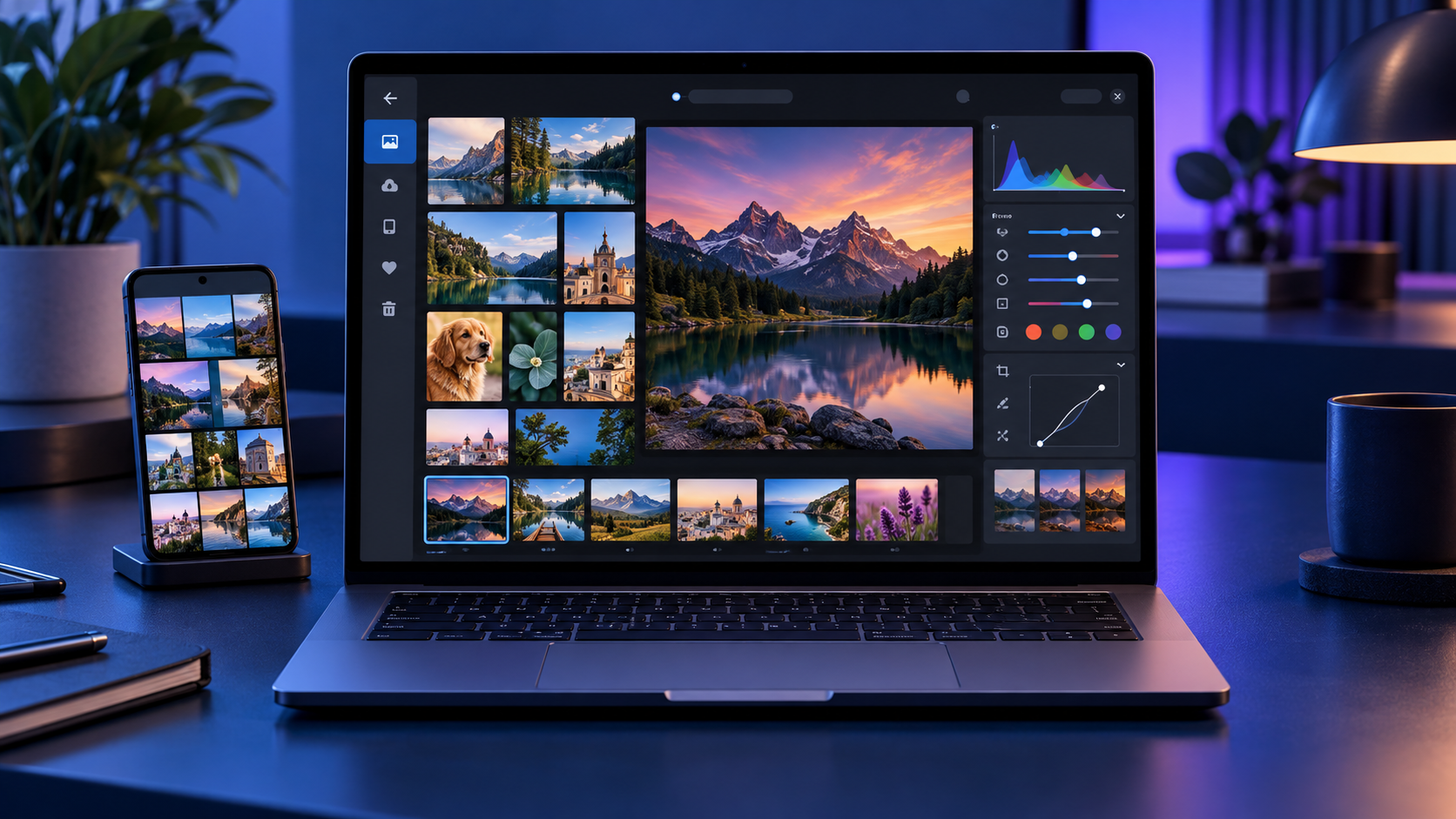
Microsoft began rolling out a rebuilt Photos app to Windows Insiders on October 15, 2026, with a broader Windows 11 release planned for later this year. The redesign is more than a fresh coat of paint: it combines photos stored on the PC, OneDrive and iCloud in one Gallery, adds a native editing workspace, and makes the Viewer faster.
The most useful changes are practical ones. Microsoft says the new Editor launches 25% faster, the native Viewer opens images about 15% faster on average, and HEIC files can load up to 30% faster. The app also preserves HDR while editing, can save HEIC and WebP files, expands object removal, and introduces Relight controls with as many as three movable light sources.
Windows 11 Photos redesign at a glance
- Rollout begins with Windows Insiders on October 15, 2026, before expanding to Windows 11 users later in 2026.
- Gallery brings local folders, OneDrive and iCloud photos into one browsing experience.
- Natural-language search can find images by subject, place or scene instead of requiring an exact filename.
- The WinUI 3 Editor adds HDR-preserving edits, HEIC and WebP saving, object removal, crop templates and Relight.
- The native Viewer is faster and adds SVG support, richer metadata, a map, a histogram and visual search.
- Some cloud and AI-assisted features depend on account, region, device and staged rollout availability.
One Gallery for PC, OneDrive and iCloud
The redesigned Gallery is meant to reduce the friction of keeping several photo libraries. Local folders remain available, while signing in to OneDrive can add backed-up phone photos and other cloud images. iPhone owners can also surface iCloud Photos through Apple’s iCloud for Windows integration.
A Microsoft account is not required just to browse files stored on the PC, and iCloud uses Apple’s sign-in flow. OneDrive-specific experiences such as People, Albums and Moments do require OneDrive. That distinction matters if you prefer a local library: the core viewer and editing tools are still useful without turning every folder into a cloud collection.
The new layout also makes it easier to filter the library, move between recently added images and inspect a photo without opening a separate editor. Microsoft says the design is optimized for browsing across sources, but the speed of cloud thumbnails will still depend on the network and whether full-resolution files are stored locally.
Natural-language search makes large libraries easier to use
Instead of remembering a filename or the date a picture was taken, the new search can accept ordinary descriptions. Queries such as “sunset at the beach,” “dog in the snow” or “receipts from a restaurant” are the sort of requests the feature is designed to understand.
Search quality will vary with the contents of the library and the services connected to Photos. Treat it as a faster way to narrow a large collection, not a replacement for consistent folders, albums and backups. Sensitive images also deserve extra care whenever a feature analyzes content, so review Microsoft and cloud-provider privacy settings before connecting a personal archive.
Editing tools: HDR, HEIC, Repair and Relight
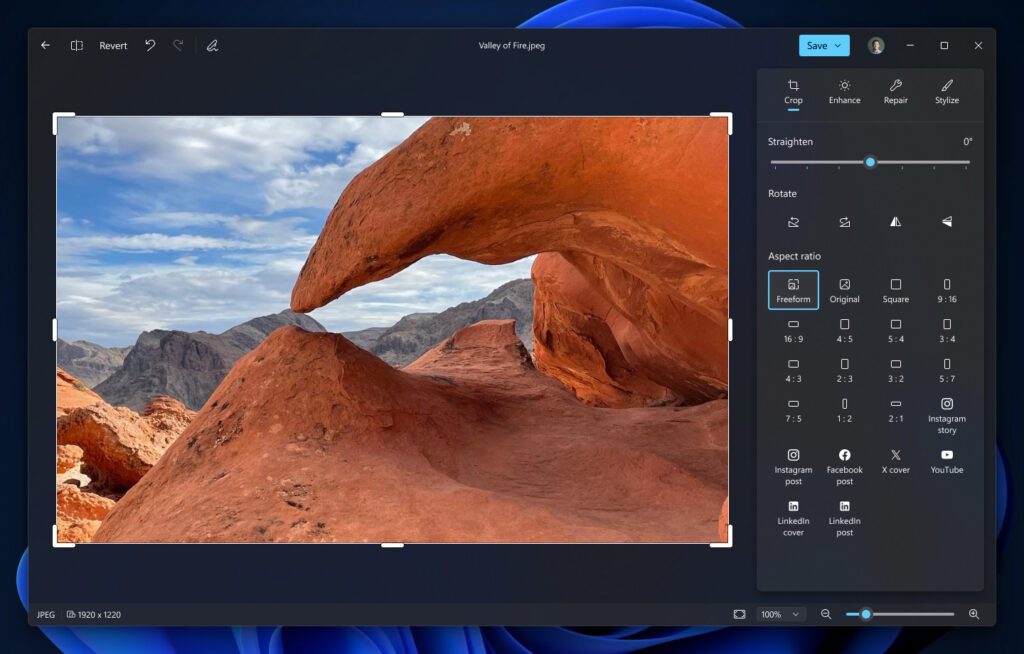
Microsoft rebuilt the Editor as a native WinUI 3 experience and says it starts 25% faster. Its main tool groups are Crop, Enhance, Repair and Stylize. The redesigned workspace keeps common adjustments close to the image and adds crop templates sized for popular social formats.
HDR is a major improvement. Photos can now preserve high dynamic range while you make edits instead of flattening the image into standard dynamic range. The editor can also open, edit and save HEIC and WebP files, which should reduce conversion steps for iPhone photos and images downloaded from the web.
Repair expands the app’s object-removal workflow, while Relight lets you place and tune as many as three virtual lights. The lights can be moved around the subject and adjusted for intensity and color, making Relight useful for portraits or products that were photographed with uneven illumination. Microsoft describes these as editing aids, not a substitute for a full layer-based editor.
Relight availability may differ during the rollout
Microsoft’s October 15 announcement says Relight is expanding to all Windows 11 devices. At the time of publication, Microsoft’s existing Relight support page still describes the feature as exclusive to Copilot+ PCs and notes that its AI processing runs locally. That mismatch likely reflects staged rollout timing or documentation that has not caught up, so do not assume Relight will appear on every PC immediately.
The redesigned Viewer is faster
The native Viewer is the part most people will use every day. Microsoft reports an average 15% launch improvement and as much as a 30% speed gain for HEIC images. Those numbers are Microsoft’s measurements rather than independent benchmarks, and actual results will depend on storage speed, file size and hardware.
The Viewer also improves HDR rendering, adds SVG support and surfaces more useful information without sending you to another app. A metadata pane can show capture details, a map can identify geotagged locations, and a histogram helps evaluate exposure. Visual search provides another route to identify or find related subjects.
What you need for iCloud and OneDrive photos
- For iCloud Photos, install Apple’s iCloud for Windows app, sign in with the Apple Account that owns the library, and enable iCloud Photos.
- For Android or iPhone camera uploads, configure OneDrive camera backup in the OneDrive mobile app and allow the permissions it requests.
- Keep an independent backup of irreplaceable photos. A synchronized cloud library is convenient, but synchronization can also propagate accidental deletions.
- If cloud photos appear as thumbnails only, open or download the full-resolution file before making an edit you need to preserve at maximum quality.
Microsoft ended the older Samsung Gallery direct-to-OneDrive sync route on September 30, 2026. Samsung phone owners who want new camera photos in OneDrive should use OneDrive’s camera backup instead of relying on the retired Gallery integration.
Rollout timing and how to check for the new app
Windows Insiders are first in line beginning October 15. Microsoft says the new Photos experience will reach all Windows 11 users later in 2026, but it has not promised that every device, region and feature will update on the same day.
- Open Microsoft Store, choose Library, and select Get updates.
- Update Microsoft Photos when a newer version is offered.
- Restart Photos after the update and look for the unified Gallery and redesigned Editor.
- If the Store reports that Photos is current but the redesign is missing, wait for Microsoft’s server-side rollout rather than reinstalling Windows.
Insider builds are preview software. If Photos is essential to a production workflow, the safer choice is to wait for the stable release and keep another trusted viewer or editor installed until the rollout settles.
What the redesign does not replace
The new Photos app remains a photo organizer, viewer and lightweight editor. It is not a Photoshop-class layer editor, a digital asset manager for large professional catalogs, or a full video-editing suite. Microsoft continues to direct video editing to Clipchamp.
The app’s cloud integrations also do not merge ownership of the original files. A photo stored in iCloud is still governed by the iCloud library and storage plan, while a OneDrive image follows OneDrive’s rules. Before cleaning up duplicates, confirm which service holds the original and whether the file is available offline.
Should you install it now?
For most people, the redesign is worth taking when it reaches the stable channel. Faster HEIC handling, HDR-safe edits and a single view for local and cloud libraries address everyday pain points without forcing users into a complex professional editor.
Insiders should test the app with copies of important files first, especially when using newer formats or cloud-only images. Compare the edited image at full resolution, confirm its color and HDR behavior on another device, and verify that the original remains recoverable.
If an aging PC struggles with large photo libraries, you can compare current Windows 11 laptops on Amazon. A faster SSD and a color-accurate display will usually matter more for photo work than an elaborate spec sheet.
As an Amazon Associate, ReaderSpice earns from qualifying purchases.
Bottom line
The Windows 11 Photos redesign is a meaningful update because it improves the app’s basic jobs before adding novelty. A faster Viewer, better HEIC performance, HDR-preserving edits and a unified Gallery should benefit almost anyone who manages phone and PC photos. Relight and natural-language search add useful depth, but availability will remain uneven while the Insider rollout expands and Microsoft updates its support documentation.
Sources
Microsoft Windows Blog: Meet the new Photos app on Windows 11
Microsoft Windows Blog: What’s new in Windows 11 — everyday experiences reimagined
Microsoft Support: Relight in Photos
Microsoft Support: Edit photos and videos in Windows
Microsoft Support: Use OneDrive on Android and iOS devices
Apple Support: Set up iCloud Photos on a Windows computer