
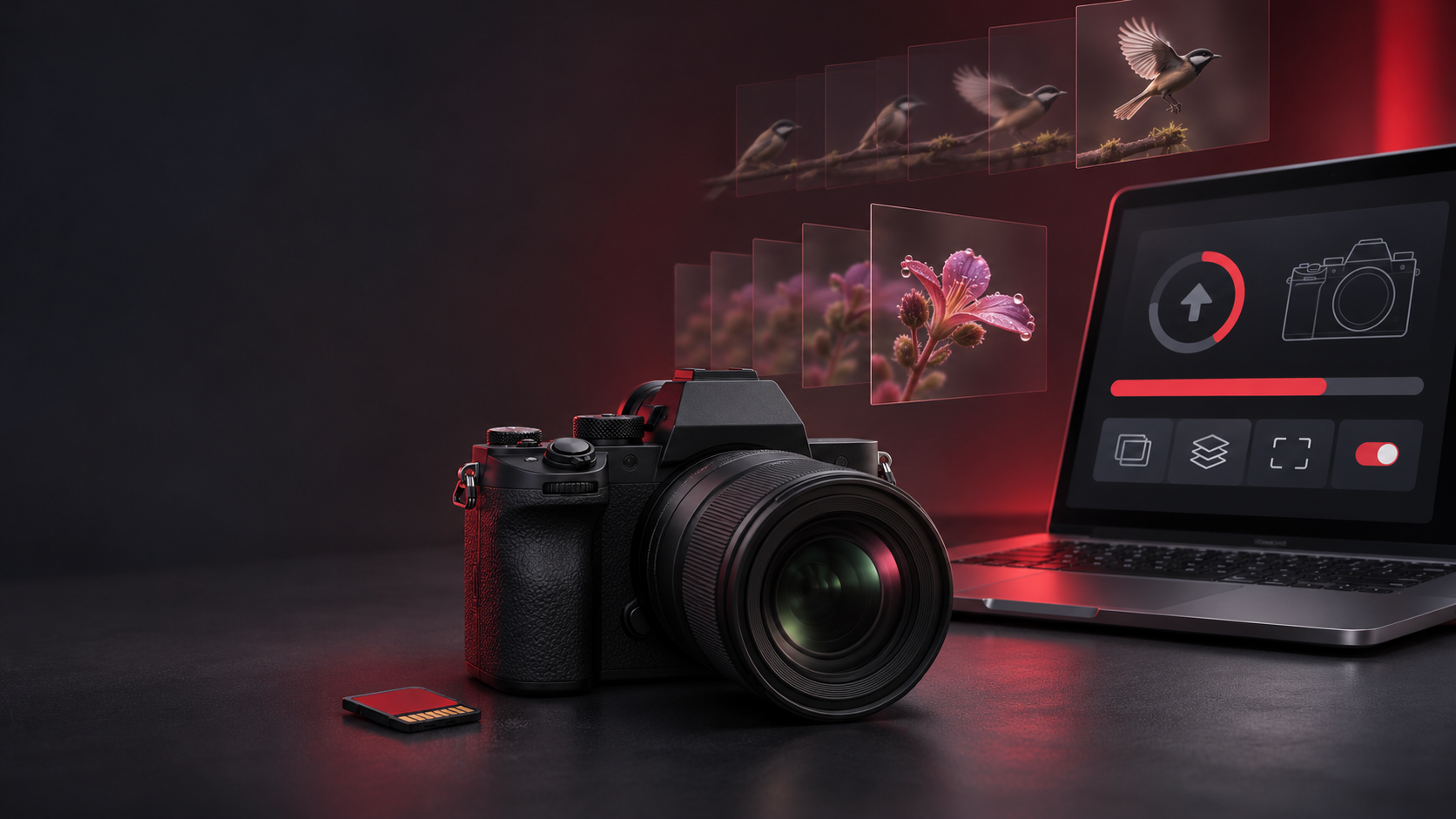
Leica has released firmware 5.0.0 for the Q3, Q3 43, Q3 Monochrom, SL3, SL3-S and SL3-P. The shared headline is focus bracketing: every supported body can now capture a controlled series with shifting focus planes for later stacking. The SL3 family also gains pre-shot capture, which can save frames recorded before the shutter button is pressed fully.
The update is not identical across the two camera families. Q3 models receive lower-bitrate Long GOP video formats, vehicle autofocus detection and full-interface HDMI mirroring, while SL3 models get lens-control improvements, expanded L-Mount support and model-specific display or shutter options. Pre-shot does not come to the Q3 family, and neither family creates a finished focus stack in the camera.
This is a sourced update and installation guide, not a hands-on review. ReaderSpice has not measured autofocus accuracy, buffer recovery, battery drain, focus-step consistency, HDMI behavior or real-world update reliability on production cameras. The practical advice below follows Leica’s release notes and separates confirmed functions from assumptions.
Leica firmware 5.0 at a glance
- Supported Q cameras: Leica Q3, Q3 43 and Q3 Monochrom.
- Supported SL cameras: Leica SL3, SL3-S and SL3-P.
- Shared feature: focus bracketing with a selectable frame count, focus increment and capture sequence.
- SL3-only feature: pre-shot capture with the electronic shutter and a selectable 0.5-, 1.0- or 1.5-second look-back window.
- Q3-only additions: storage-efficient Long GOP video options, including 8K and C8K combinations, vehicle detection and HDMI mirroring with the user interface.
- Install paths: Leica FOTOS is the recommended route; a correctly prepared model-specific firmware file on a memory card is the manual alternative.
- Update warning: do not switch off the camera or remove the memory card, battery or lens while the firmware is installing.
- Focus-stack limit: the camera records the bracketed frames, but compatible desktop software is still required to merge them.
Which cameras are supported and which are not
Firmware 5.0.0 is published as one release-note family for the Q3, Q3 43 and Q3 Monochrom, and a separate release-note family for the SL3, SL3-S and SL3-P. Leica also supplies model-specific firmware packages. Download the file from the exact camera page; a similar product name or a shared feature list is not permission to load another model’s package.
The release does not list the Q2, Q2 Monochrom, SL2, SL2-S, M11 or other Leica bodies. Those cameras follow their own firmware branches. If a camera is not one of the six named models, use its official downloads page and current release notes instead of assuming version 5.0.0 applies.
Existing firmware matters too. Leica’s updater normally checks the target camera, but owners should still record the installed version, save custom profiles where the menu offers that option, and download the matching package again if the file name or source is uncertain. Do not install a file received through a forum, file-sharing service or reseller support page when Leica provides the original.
What the SL3 family gains
Focus bracketing and pre-shot
The SL3, SL3-S and SL3-P all receive focus bracketing and pre-shot. Focus bracketing is aimed at macro, tabletop, product, architecture and landscape work where a single exposure cannot keep the desired range sharp. Pre-shot targets action that begins before human reaction catches up: a bird taking flight, a player striking a ball or a brief expression.
Lens controls and handling changes
Compatible L-Mount lens function buttons can now be assigned from the camera, and the focus-ring direction can be changed on supported lenses. Leica also adds Focus Recall and Power Focus support for the Sigma 300-600mm F4 DG OS Sports, improves detection of lenses without focus or aperture motors and adds a profile for the Summicron-M 66 f/2.
A new stability display supports hand-held Multi-Shot capture. The SL3-S and SL3-P receive a sharper magnified live view in the central EVF area, while the SL3-P alone can be set to close its mechanical shutter at power-off for added sensor protection during lens changes. That shutter-closing option is off by default and does not make lens changes dust-proof.
The firmware also fixes the display of 2TB card capacity, restores AF-Lock behavior with some detection modes, corrects a waveform toggle problem, improves automatic white balance consistency in tungsten bursts and changes the default shutter speed in M and S from 1/250 second to 1/200 second. Owners who rely on a memorized default should notice that last change before the next assignment.
What the Q3 family gains
Focus bracketing without pre-shot
Q3, Q3 43 and Q3 Monochrom owners get the same basic focus-bracketing controls but not pre-shot capture. The Q3 release notes do not describe a hidden buffer mode or a later activation switch. Treat any claim that firmware 5.0 adds pre-shot to a Q3 as incorrect unless Leica publishes a separate change.
Video, autofocus and monitoring changes
Leica adds lower-bitrate Long GOP choices across several resolutions and frame rates, including 8K and C8K combinations. These formats can reduce card use and transfer time compared with heavier recording modes, but a lower bitrate can also leave less data for difficult motion, texture or grading. Test the exact codec in the intended editor before changing a production workflow.
Vehicle autofocus adds separate choices for an entire car or selected vehicle parts. The camera can prioritize distant or fast-moving vehicles in the full-car mode, while the parts option is designed for closer details such as bodywork or a driver’s helmet. An assignable function button can now toggle AF Detection, reducing menu travel when moving between subject recognition and a conventional focus area.
HDMI mirroring can send the full camera display, including menus and on-screen icons, to an external screen. Leica describes this as an on-set monitoring function when HDMI is not being used for external recording. It is not a clean-feed replacement: choose the output mode that matches whether the monitor needs camera information or an uncluttered image.
Other Q3 improvements include reduced electronic-shutter lag in continuous shooting at 15 fps and faster, a warning for a significantly diminished BP-SCL6 battery, a new clean full-screen playback view, revised multi-item selection and more Control Center shortcuts. Bug fixes cover Leica Looks clipping display, EVF/LCD switching in playback and focus-frame position after a restart or playback change.
How focus bracketing works
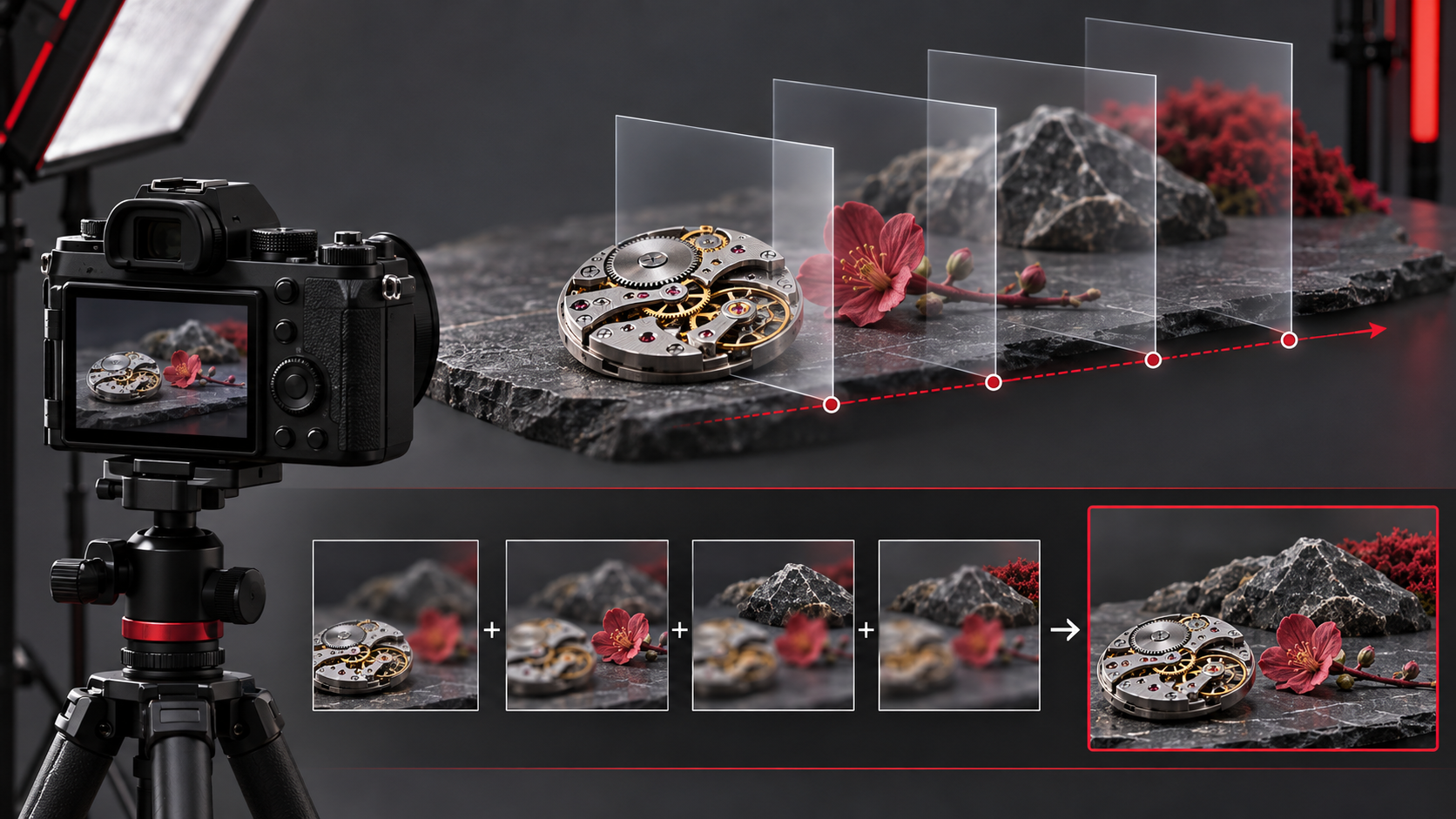
Firmware 5.0 records a sequence with shifted focus planes; separate software is still needed to merge the frames into a focus stack. Illustration: ReaderSpice.
Leica lets the photographer choose the number of frames, a focus step and the sequence. The documented frame-count range is two through 999. Steps 1 through 3 are intended for high magnification and very shallow depth of field, steps 4 and 5 for product or tabletop work, and steps 6 through 10 for larger scenes such as architecture and landscapes. Those are starting points, not universal prescriptions: lens focal length, subject distance, aperture and desired overlap all matter.
The bracket begins from the selected focus position. Leica provides a forward sequence and an alternating sequence that moves in front of and behind the starting point. Exposure, ISO, white balance, aperture and resolution remain fixed during the series. The resulting images are saved in order and grouped in playback, but the camera does not blend them into a final file.
- Mount the camera on a solid tripod and turn off anything that can move the subject, including a fan or unstable tabletop.
- Compose and expose manually so brightness and color do not shift between frames.
- Choose an aperture that balances lens performance and depth of field; do not rely on the smallest aperture when diffraction would reduce detail.
- Set the starting focus point deliberately and run a short bracket first. Review the near and far frames at high magnification.
- Increase the frame count or reduce the step if gaps appear between sharp planes. Use a larger step only when the scene depth and overlap justify it.
- Merge copies in compatible software and inspect edges, reflective surfaces, moving leaves and fine hair for halos or stacking errors.
- Keep the original frames. A flawed composite can often be rebuilt, while a discarded source sequence cannot.
Leica recommends a tripod for the most consistent result. A hand-held bracket can work in favorable conditions, but alignment becomes harder and subject movement can create artifacts. Firmware adds the capture sequence, not immunity from movement, focus breathing, flicker or stacking-software limitations.
How SL3 pre-shot capture works
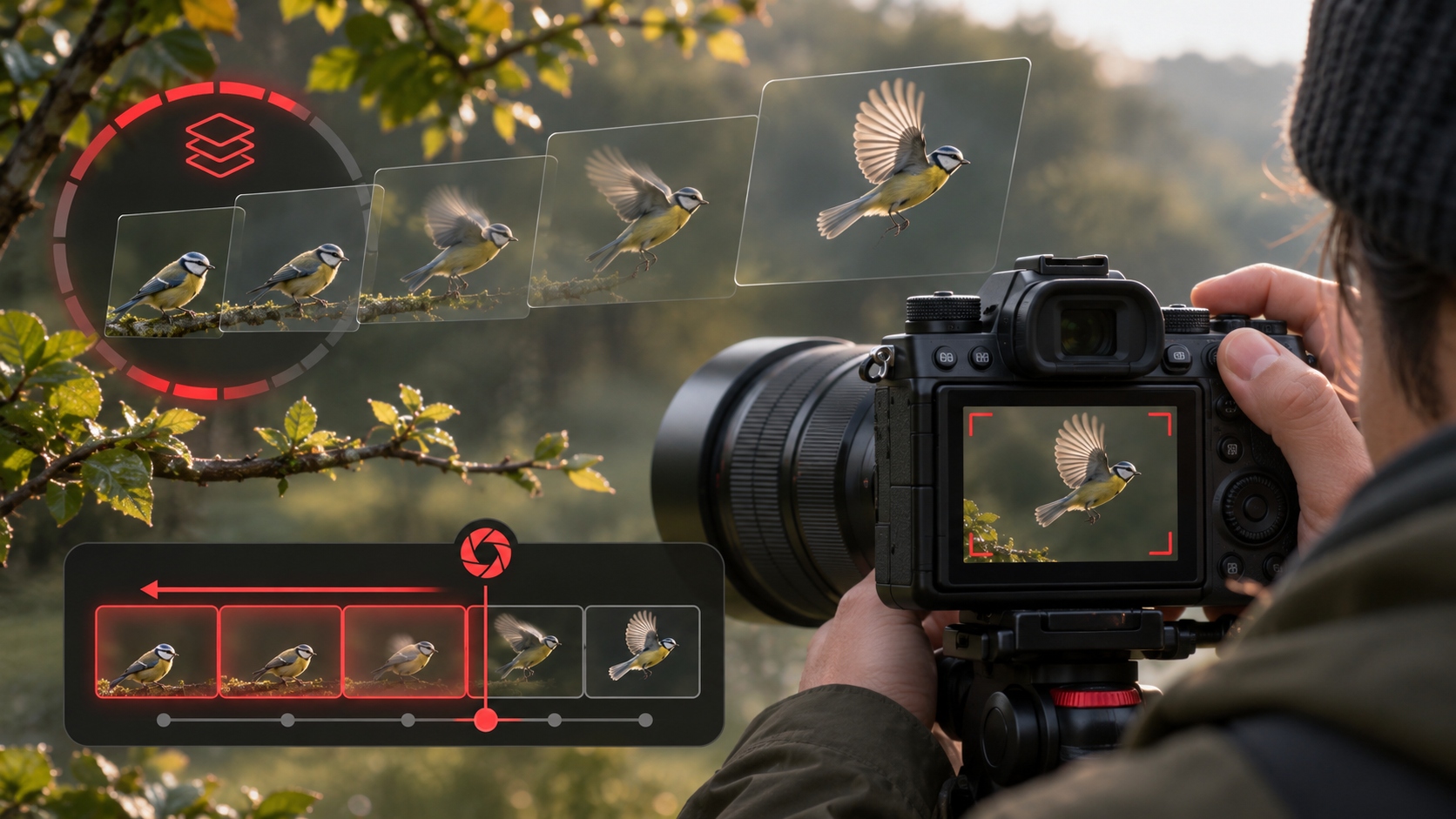
On SL3 models, a half-press starts the temporary buffer and a full press can save the selected interval from before the decisive moment. Illustration: ReaderSpice.
Pre-shot is available only in selected continuous-shooting modes with the electronic shutter. Pressing the shutter to the first pressure point starts a temporary rolling buffer. A full press saves the chosen 0.5, 1.0 or 1.5 seconds from before that moment along with later burst frames. If the button is never pressed fully, the temporary frames are discarded.
The look-back window is not extra, unlimited memory. Leica publishes different buffer capacities by camera, frame rate, bit depth and file format. A longer pre-shot interval can consume a larger share of the available burst before the decisive moment, leaving fewer frames afterward. The SL3-S has a deeper published buffer than the original SL3 in several modes, while the SL3-P has its own combinations. Read the table for the exact body and speed instead of copying another model’s expectation.
DNG and JPEG are supported according to the selected file format. Saving can take longer with JPEG, DNG+JPEG and, on the SL3-P, Content Credentials. Leica notes that DNG with a CFexpress card gives the shortest processing time. That does not mean every subject needs RAW or the fastest card; it means file format and media affect how soon the camera is ready for the next sequence.
- Start with 0.5 second. It reduces the chance that the buffer is filled with anticipation rather than the useful action.
- Use the electronic shutter only when rolling-shutter distortion and artificial-light banding are acceptable for the scene.
- Half-press early enough for autofocus and exposure to settle, then press fully at the action cue.
- Review the grouped sequence and keep the frame with the strongest gesture, focus and subject position rather than simply the earliest frame.
- Test card write time and buffer recovery before a paid event, sport or wildlife trip.
- Keep the shutter sound and status display behavior in mind; silent capture can make it easy to hold the buffer longer than intended.
Pre-shot improves timing odds but cannot guarantee focus or subject visibility. It also does not change lens autofocus speed, eliminate blackout in every mode or make an electronic shutter ideal for fast lateral motion. Treat it as a capture aid that still requires a tested AF mode, appropriate shutter speed and enough card performance.
Install firmware 5.0 safely
- Identify the exact camera model and record the current firmware version under Camera Information. Save custom profiles if the camera offers that prompt or export path.
- Back up photographs and video before reformatting a card. Formatting erases the card; a firmware file is not a backup.
- Fully charge the battery and leave the lens attached. Do not begin with a weak battery or an unstable external-power arrangement.
- Preferred path: open the current Leica FOTOS app, connect the camera and follow the model-specific firmware prompt. SL3-family notes require Leica FOTOS 4.8.0 or newer for the update function.
- Manual path: download the firmware package from the exact Leica camera page, remove older firmware files from the chosen card and place the new file in the card’s root directory rather than a subfolder.
- Insert the card, open Camera Information and choose the firmware update command. On a Q3, the menu is Camera Information > Firmware > Start Update; on an SL3, use Camera Information > Camera Firmware Version > Start Update.
- Confirm the displayed model and version. If the information does not match, cancel and obtain the correct file.
- Do not switch off the camera or remove the memory card, rechargeable battery or lens during installation. Wait for the completion message and restart prompt.
- After restart, confirm version 5.0.0, restore date, time, language and profiles if required, then test stills, video, autofocus, card writing and the new feature needed for the next shoot.
Leica FOTOS is the recommended route because it manages the transfer and model matching, but the camera still needs a charged battery and an uninterrupted process. A phone notification, temporary Wi-Fi change or application switch should not be treated as permission to power down the camera. Follow the screen until both devices indicate completion.
If the update or new feature misbehaves
- Update not offered in FOTOS: confirm the app version, camera pairing, battery level and internet connection, then check the model’s official downloads page.
- Manual file not detected: confirm the file is for the exact camera, has not been renamed incorrectly and sits in the root of a supported card.
- Camera asks to format the card: stop and back up files first. Formatting is destructive and is not a troubleshooting shortcut for irreplaceable media.
- Focus bracket stops early: check battery, storage space, card health and whether a button was pressed; Leica says recorded frames remain saved when a series is stopped.
- Focus stack has soft gaps: reduce the focus step, add frames, stabilize the camera and subject, and verify the starting plane.
- Pre-shot misses the moment: confirm an eligible electronic-shutter continuous mode, hold the first pressure point before the action and review the selected duration.
- Q3 has no pre-shot menu: that is expected for firmware 5.0.0; the function is documented only for SL3 models.
- Video editor rejects a new Q3 Long GOP file: return to a known format for the assignment and test software support before converting or transcoding originals.
A relevant UHS-II SD card on Amazon
For photographers who need a fresh card for a manual update or high-bitrate recording, one real option is the SanDisk 128GB Extreme PRO SDXC UHS-II V90 card on Amazon (ASIN B08YF7PB14). The listing identifies model SDSDXDK-128G-GN4IN, and SanDisk documents UHS-II, U3 and V90 ratings. Leica recommends UHS-II media for the Q3 family and supports UHS-II SD alongside CFexpress Type B on the SL3 family.
A new card is optional. Firmware installation needs a compatible, reliable card with the correct file in the root directory; it does not require this capacity or brand. Match the card to the camera, recording format and reader, confirm the exact ASIN and seller, and back up any existing media before formatting. Do not assume a fast card fixes a damaged slot, corrupt download or wrong-model firmware file.
Affiliate disclosure: ReaderSpice may earn a commission from qualifying Amazon purchases made through this link, at no additional cost to you.
What firmware 5.0 does not prove
- It does not add pre-shot capture to the Q3, Q3 43 or Q3 Monochrom.
- It does not merge a focus bracket into a finished stack inside the camera.
- It does not guarantee that every lens supports assignable buttons, reversible focus direction or the same autofocus behavior.
- It does not make lower-bitrate Q3 video the best choice for every motion, grade or delivery codec.
- It does not eliminate rolling shutter, banding, buffer limits or card-write delays in electronic-shutter bursts.
- It does not mean firmware for one Leica model can be installed on another model with a similar name.
- It does not replace a backup, charged battery, verified memory card or pre-shoot test.
The bottom line
Firmware 5.0.0 is a meaningful feature update for Leica’s current Q3 and SL3 families. Focus bracketing fills a practical gap across all six cameras, while SL3 pre-shot can improve the odds of catching an unpredictable action. Q3 owners also gain useful video, autofocus and monitoring options, and SL3 owners get several lens-control and handling refinements.
The value depends on disciplined setup. Download the model-specific package, preserve profiles and media, keep power stable, verify the restart and test the exact feature before a critical shoot. Use a tripod and external software for focus stacking, start pre-shot with the shortest useful interval, and remember that the Q3 and SL3 feature lists are not interchangeable.
Sources
- Leica Camera — Q3-family downloads and firmware 5.0.0 packages
- Leica Camera — Q3, Q3 43 and Q3 Monochrom firmware 5.0.0 release notes
- Leica Camera — SL3 downloads and model-specific firmware guidance
- Leica Camera — SL3, SL3-S and SL3-P firmware 5.0.0 release notes
- Leica Camera — Q3 technical specifications and UHS-II storage support
- Leica Camera — SL3 product page and UHS-II plus CFexpress storage support
- Leica Camera — Leica FOTOS application and camera connectivity
- SanDisk — Extreme PRO SDXC UHS-II V90 card product information
- Amazon — SanDisk 128GB Extreme PRO SDXC UHS-II V90, ASIN B08YF7PB14 (affiliate link)